
3 in 1 Wireless Charger
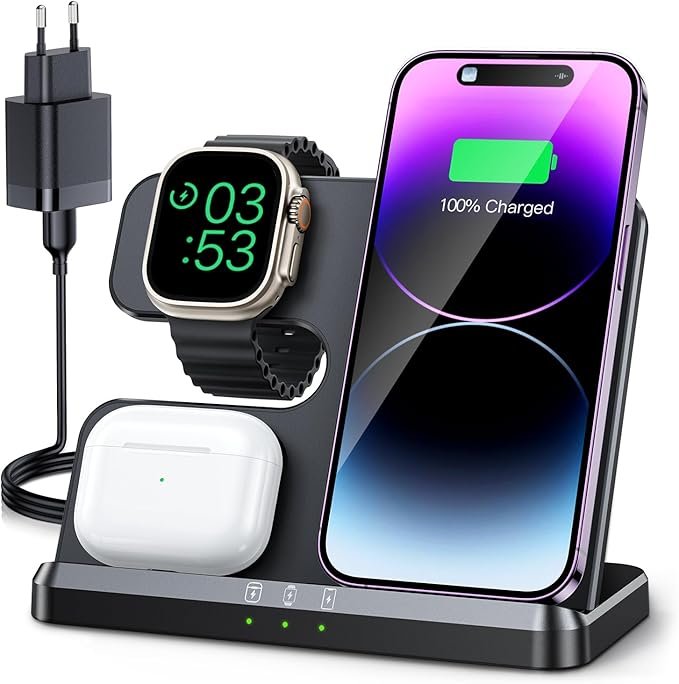
3-in-1 Wireless Charger: The Ultimate Convenience for Your Devices
In today’s world, where we rely on multiple devices to stay connected, organized, and productive, charging them can often become a hassle. Whether it’s your smartphone, smartwatch, or wireless earbuds, keeping track of multiple charging cables and power adapters is not only inconvenient but can also create unnecessary clutter. Enter the 3-in-1 wireless charger—a sleek, efficient, and practical solution designed to streamline your charging routine and keep your devices powered up effortlessly.
In this article, we’ll explore what a 3-in-1 wireless charger is, its features, benefits, and how it can make charging your devices simpler and more organized.
What is a 3-in-1 Wireless Charger?
A 3-in-1 wireless charger is a charging station that allows you to charge three different devices simultaneously—wirelessly. Most commonly, these devices include:
- Smartphone: The main charging area is designed for smartphones that support Qi wireless charging. This includes popular models like the iPhone, Samsung Galaxy, and other Qi-compatible devices.
- Smartwatch: There is a dedicated charging pad or dock for your smartwatch. This works for devices like the Apple Watch, Samsung Galaxy Watch, or other smartwatches that support wireless charging.
- Wireless Earbuds: The third part of the charging station is designed to charge your wireless earbuds or headphones, such as the AirPods or Galaxy Buds, which also feature Qi wireless charging.
With a 3-in-1 wireless charger, you can charge all of your essential devices at once, without the need for multiple cables, adapters, or charging ports. Simply place your devices on their respective charging pads, and let the charger do the rest.
How Does a 3-in-1 Wireless Charger Work?
A 3-in-1 wireless charger works using Qi wireless charging technology, which uses an electromagnetic field to transfer energy between the charger and the device. Here’s a breakdown of how it functions:
- Magnetic Alignment: Most wireless chargers, including 3-in-1 models, come with built-in magnetic alignment systems or specifically designed charging pads that help position your devices correctly. This ensures that your devices are charging properly, even without physical cables.
- Inductive Charging: Wireless chargers use a process called inductive charging. The charger generates an electromagnetic field, which is transferred to a coil in your device that supports wireless charging. This coil converts the energy back into electrical power to charge the device’s battery.
- Multi-Device Charging: A 3-in-1 wireless charger has multiple charging zones—usually for a smartphone, smartwatch, and wireless earbuds. When you place your devices on the designated spots, the charger simultaneously powers them up, eliminating the need for separate charging cables for each device.
- Fast Charging: Many 3-in-1 wireless chargers support fast charging for compatible devices. This allows you to quickly charge your phone or other devices, reducing the time you spend waiting for them to reach full power.
Features of a 3-in-1 Wireless Charger
- Multiple Charging Pads:
The most obvious feature of a 3-in-1 wireless charger is the ability to charge three devices at once. These typically consist of:- A larger pad for your smartphone.
- A smaller pad or dock for your smartwatch.
- A charging compartment or small pad for your wireless earbuds.
This design keeps your devices organized and ensures you don’t need multiple charging cables.
- Qi Wireless Charging:
Qi (pronounced “chee”) is the global standard for wireless charging. A 3-in-1 wireless charger typically supports Qi wireless charging, which is compatible with a wide range of smartphones, smartwatches, and earbuds. - Fast Charging Support:
Many 3-in-1 wireless chargers are equipped with fast-charging technology, allowing devices that support it (such as newer iPhones, Samsung devices, and some smartwatches) to charge at faster rates. This feature reduces the time it takes to power up your devices. - LED Indicators:
Some models come with LED indicator lights that show you the charging status of each device. Green or blue lights usually indicate that charging is in progress, while a red light may indicate an issue, such as improper alignment or incompatible devices. - Compact and Space-Saving:
One of the main advantages of a 3-in-1 wireless charger is its compact and streamlined design. These chargers are often sleek and space-saving, making them ideal for use on a nightstand, desk, or countertop. By consolidating three charging stations into one, these chargers reduce clutter and simplify your charging setup. - Non-Slip Design:
Many 3-in-1 wireless chargers have a non-slip surface, ensuring your devices stay securely in place while charging. This is especially useful for phones with wireless charging cases or smartwatches that need to remain properly aligned with the charging pad. - Overcharge Protection:
Most 3-in-1 wireless chargers are designed with overcharge protection to prevent the devices from overheating or receiving too much power. This ensures the longevity of your devices’ batteries by automatically stopping the charging process once the device reaches 100%.
Benefits of Using a 3-in-1 Wireless Charger
- Convenience:
The most obvious benefit of a 3-in-1 wireless charger is the convenience it offers. Instead of needing three separate charging cables and adapters, you can charge all of your devices in one place. It saves time and effort by allowing you to charge your phone, smartwatch, and earbuds simultaneously. - Space-Saving:
A 3-in-1 charger is an excellent space-saver. If you have limited space on your desk, nightstand, or countertop, a wireless charger that combines three charging spots into one neat design is an efficient solution. It helps keep your space tidy and organized. - Fewer Cables:
By eliminating the need for multiple charging cables, a 3-in-1 wireless charger reduces clutter and minimizes the risk of tangled cords. This is especially useful in environments like your bedroom or living room, where cables can easily get in the way. - Safer for Devices:
With wireless charging, there’s less physical wear and tear on your device’s charging port. Repeatedly plugging in and unplugging charging cables can wear out a phone’s port over time, but with wireless charging, there’s no need for physical contact, which prolongs the life of your devices. - Sleek and Modern Look:
Many 3-in-1 wireless chargers feature a minimalist and modern design that fits seamlessly into any décor. Whether you use it at home, at work, or in a hotel, these chargers often have an aesthetic appeal that complements your space. - Energy Efficiency:
Wireless chargers are generally more energy-efficient compared to traditional wired chargers. They automatically stop charging once your device is fully charged, reducing unnecessary power consumption.
How to Use a 3-in-1 Wireless Charger
Using a 3-in-1 wireless charger is simple and straightforward:
- Place the Charger: Position the charger on a flat surface, such as your nightstand, desk, or kitchen counter. Ensure it is plugged into a power source, typically through a USB-C or AC adapter that is included in the package.
- Place Devices on Charging Pads:
- Smartphone: Position your smartphone in the center of the larger charging pad.
- Smartwatch: Align your smartwatch in the designated charging dock or pad.
- Earbuds: Place your wireless earbuds on the earbud charging section.
- Wait for the Charging Indicators: Most chargers will show a LED light to indicate charging status. A green or blue light generally means the device is charging properly, while a red light may indicate a misalignment or that the device isn’t compatible.
- Remove Devices When Fully Charged: Once your devices reach full charge, it’s best to remove them from the charging pads to avoid unnecessary power usage. Most 3-in-1 wireless chargers will automatically stop charging when the devices are fully charged, thanks to built-in overcharge protection.
Things to Consider When Buying a 3-in-1 Wireless Charger
- Compatibility:
Ensure the charger is compatible with the devices you own. Not all wireless chargers are suitable for all phones or smartwatches. Check that the charger supports Qi wireless charging and is designed for your specific devices (such as Apple Watch or Samsung Galaxy Watch). - Charging Speed:
Look for a charger that supports fast charging if you want quicker power-ups for your devices. Some 3-in-1 chargers offer fast charging options for smartphones, while others are standard. - Build Quality:
Choose a charger that’s well-built and durable. Look for features like overcharge protection, anti-slip pads, and heat dissipation to ensure that your devices are charged safely. - Size and Design:
Consider how much space you have on your desk or nightstand. Some chargers are compact and low-profile, while others may be bulkier. Select a charger that fits well in your space while also complementing your décor. - Power Source:
Some 3-in-1 chargers require a USB-C power adapter, while others might need a wall plug. Check the power requirements to ensure you have
