
Wireless Car Stereo
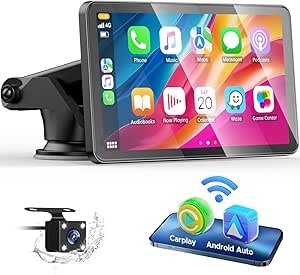
Upgrade Your Drive: The Ultimate Guide to Wireless Car Stereo for Apple CarPlay
For many drivers, the smartphone is the heart of the vehicle’s entertainment and navigation system. However, fumbling with cables every time you get into the driver’s seat can be a hassle. Upgrading to a wireless car stereo for Apple CarPlay is one of the most significant quality-of-life improvements you can make for your vehicle. It seamlessly bridges the gap between your iPhone and your dashboard, offering a safer and more convenient driving experience.
Why Switch to Wireless Apple CarPlay?
The primary appeal of a wireless system is the “set it and forget it” convenience. As soon as you start your engine, your phone connects via Bluetooth and Wi-Fi, automatically launching the CarPlay interface on your dash.
1. Clutter-Free Dashboard
Cables often get tangled around the gear shifter or clutter up the center console. Wireless connectivity keeps your cabin looking clean and professional while freeing up your charging ports for other passengers.
2. Full Access to Siri
With a wireless head unit, you can keep your eyes on the road and your hands on the wheel. You can ask Siri to send texts, set reminders, or change your Spotify playlist without ever touching your phone.
3. Real-Time Navigation
CarPlay allows you to use Apple Maps, Google Maps, or Waze on a much larger, high-resolution screen. You get real-time traffic updates and lane guidance, ensuring you never miss a turn.
Key Features to Look for in a Wireless Head Unit
When shopping for a wireless car stereo on Amazon, it is important to look beyond just the price tag. Here are the technical aspects that truly matter:
Screen Type: Capacitive vs. Resistive
Always opt for a capacitive touchscreen if your budget allows. These screens are glass-based (like your iPhone) and respond to the lightest touch. Resistive screens are plastic-based and require more pressure, which can be frustrating while driving.
Boot-Up Time
Since the connection is wireless, you want a stereo with a fast processor. High-quality units will have your CarPlay interface ready to go within 10 to 15 seconds of turning the key.
Screen Brightness and Anti-Glare
Direct sunlight can wash out a cheap display. Look for units with high nit brightness levels and anti-glare coatings so you can clearly see your maps even on the sunniest days.
Audio Quality and EQ Settings
A great stereo should also improve your car’s sound. Look for units with built-in pre-amps and a 10-band or 13-band equalizer (EQ) to fine-tune your speakers to your liking.
Installation Tips for a Smooth Setup
While many people choose to have their wireless car stereo professionally installed, many modern kits are designed for DIY enthusiasts.
- Check Vehicle Compatibility: Use a fit guide to ensure the “Single DIN” or “Double DIN” size matches your car’s dashboard.
- Wiring Harnesses: Purchase a vehicle-specific wiring harness. This allows you to plug the new stereo into your car’s existing factory wires without cutting or soldering.
- Microphone Placement: Most kits come with an external microphone. For the best voice clarity with Siri, mount the mic on the steering column or near the rearview mirror.
- Firmware Updates: Once installed, check the manufacturer’s website for firmware updates. These updates often improve wireless stability and add compatibility for the latest iOS versions.
Conclusion
A wireless car stereo for Apple CarPlay transforms an aging vehicle into a modern, connected machine. It provides a safer way to stay communicated and entertained without the constant annoyance of plugging in cables. Whether you are commuting to work or heading out on a long road trip, the convenience of having your favorite apps ready to go at the touch of a button is an investment every iPhone user will appreciate.
