
Power bank
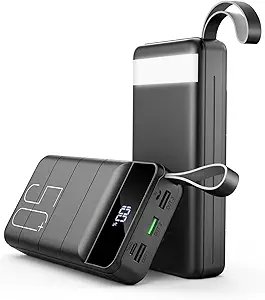
Power Bank: The Complete Guide to Choosing, Using, and Buying the Best
In today’s fast-moving world, staying connected has become essential. Whether you are commuting, traveling, working remotely, or just out for the day, a power bank ensures that your smartphone, tablet, earbuds, or other USB-powered devices never run out of juice. With so many options available, choosing the right power bank can be overwhelming.
This comprehensive guide explains everything you need to know about power banks — how they work, what features matter most, different types, safety tips, top recommendations, and how to choose one that fits your needs.
What Is a Power Bank?
A power bank is a portable battery charger that stores electrical energy and later transfers it to other devices. Think of it as an external battery that you can carry with you. When your smartphone or tablet battery gets low, you plug it into the power bank through a USB cable and recharge on the go.
Power banks are essential accessories for anyone who uses mobile devices regularly, especially when access to electrical outlets is limited.
How Does a Power Bank Work?
Power banks contain rechargeable lithium-ion or lithium-polymer cells that store energy. Here is how they work step-by-step:
- Charging the Power Bank:
You connect the power bank to a power source such as a wall charger or laptop USB port. - Storing Energy:
The internal battery cells absorb and store electrical energy. - Output to Devices:
When you connect your phone, tablet, or other gadgets through a USB cable, the power bank releases stored energy to charge the device.
Most power banks also include safety circuitry to prevent overcharging, overheating, and short circuits.
Why You Need a Power Bank
Long Commutes and Travel
Whether you are on a long train ride, bus trip, or flight, a power bank ensures your devices stay powered.
Outdoor Activities
For hiking, camping, or long outdoor events, a power bank becomes essential to keep devices alive.
Backup Power for Work
Remote work, field visits, meetings, and conferences often require extended device usage where outlets may not be accessible.
Multiple Device Charging
Modern power banks can charge multiple devices simultaneously — phones, tablets, Bluetooth speakers, headphones, and more.
Important Features to Consider
When selecting a power bank, the following features should be on your checklist:
Capacity (mAh)
Measured in milliampere-hours (mAh), this determines how much charge the power bank can store.
- 10,000 mAh: Good for one to two phone recharges
- 20,000 mAh: Multiple recharges and tablets
- 30,000 mAh+: Powerful option for longer trips or multiple devices
Output Power (Wattage)
Output power determines how fast your devices will charge. Look for:
- 5W–10W: Standard charging
- 18W+ / Fast Charging: Faster recharge for compatible phones
- 30W+ / Laptop Support: Can charge lightweight laptops
Number of Ports
More USB ports allow you to charge more than one device at a time.
Port Type
Look for USB-A, USB-C, and especially USB-C Power Delivery (PD) for faster charging and compatibility with modern devices.
Pass-Through Charging
Some models allow the power bank to charge itself and your device at the same time.
Weight and Size
Higher capacity usually means bigger and heavier devices. Choose based on portability needs.
Types of Power Banks
Standard Power Banks
These are the most common and affordable models, ideal for phones and small devices.
Fast Charging Power Banks
Equipped with Quick Charge or Power Delivery, these deliver faster charging speeds.
Solar Power Banks
Ideal for outdoor and emergency use, these recharge via sunlight.
Wireless Power Banks
These models charge devices wirelessly using compatible technology like Qi charging.
Rugged Power Banks
Built with reinforced bodies for outdoor adventure, resistant to shocks, dust, and water.
Top Power Bank Recommendations
Here are some highly rated power banks that offer reliability, performance, and value.
Recommended Power Bank 1: High-Capacity Everyday Power Bank
Features
- 20,000 mAh high capacity
- Dual USB outputs
- Fast charging support
- Compact design
Check the latest price and details here:
Affiliate Link Placeholder
This power bank is ideal for travelers and daily commuters who need multiple device backups.
Recommended Power Bank 2: USB-C Power Delivery Model
Features
- 18 W USB-C Power Delivery
- USB-A and USB-C outputs
- Lightweight and portable
Check the latest price and details here:
Affiliate Link Placeholder
Perfect choice for modern smartphones and small tablets requiring rapid charging.
Recommended Power Bank 3: Rugged Outdoor Power Bank
Features
- Solar charging support
- Water and dust resistant
- Built-in flashlight
Check the latest price and details here:
Affiliate Link Placeholder
Great for camping, hiking, and emergency preparedness.
How to Charge Your Devices with a Power Bank
Charging your devices with a power bank is simple:
- Connect your phone or device to the power bank using the appropriate USB cable.
- Press the power button on the power bank (if available).
- Charging should start automatically.
- Once charging is complete, disconnect the cable.
Make sure to charge the power bank regularly so it’s ready when you need it.
Power Bank Safety Tips
Safety is crucial when using any portable battery device. Follow these tips:
Use the Right Cable
Always use high-quality cables that match the power output and device specification.
Avoid Extreme Temperatures
Power banks do not perform well in very hot or cold conditions. Avoid leaving them in direct sunlight or freezing environments.
Do Not Damage the Battery
Avoid dropping or opening the power bank. Do not try to replace internal battery cells yourself.
Do Not Overcharge
While most power banks have built-in protection, frequent overcharging can degrade battery lifespan.
Store Properly
Store your power bank in a cool, dry place when not in use.
Common Misconceptions About Power Banks
Only for Phones
Power banks can charge tablets, laptops, earbuds, Bluetooth speakers, cameras — almost any USB-powered device.
Higher Capacity Is Always Better
Not always. Very high-capacity models are bulkier and less portable. Choose based on real needs.
All Power Banks Are the Same
Quality varies drastically. Always choose models from trusted brands with safety features and good reviews.
Frequently Asked Questions (FAQ)
Will a power bank charge my laptop?
Yes — if the power bank supports USB-C Power Delivery (PD) and meets the required wattage.
How many times can a power bank charge a phone?
It depends on capacity. A 20,000 mAh power bank typically charges a phone 3–5 times.
Do power banks expire?
Power banks age over time and battery capacity reduces. It’s recommended to replace them after 2–3 years of frequent use.
Can I take a power bank on a plane?
Yes, but airlines have limits on capacity (usually up to 100 W·h without special approval). Always check specific airline regulations.
Can a power bank damage my device?
Not if you use a quality model with proper output and safety features.
Final Verdict
A power bank is one of the most useful tech accessories you can own. It ensures that your devices remain powered no matter where you are. When choosing the right model, focus on capacity, charging speed, port types, build quality, and real user reviews.
For everyday use, travel, work, or emergency situations, there is a power bank designed to fit your needs. With the right choice, you never have to worry about a low battery again.
