
Laptop Screen Extender
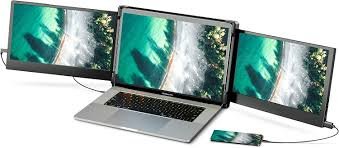
Laptop Screen Extender: Expand Your View, Boost Your Productivity
A laptop screen extender is an innovative accessory that instantly expands your workspace, allowing you to multitask, organize windows more efficiently, and elevate your productivity — whether you’re working from home, studying, coding, designing, or gaming. Instead of toggling between apps or squinting at small tabs, a screen extender gives you the extra screen real estate you need to work smarter and more comfortably.
This guide breaks down how laptop screen extenders work, key benefits, best features to look for, and tips to help you choose the right option.
What Is a Laptop Screen Extender?
A laptop screen extender (also called a portable monitor or folding display) is a secondary display that connects to your laptop — usually via USB‑C or HDMI — to give you an additional screen. Unlike bulky desktop monitors, these extenders are lightweight, portable, and designed for users on the go.
Some models clip onto the side of your laptop like a second screen, while others are freestanding portable monitors that sit beside your laptop.
Why a Screen Extender Makes Sense Today
Modern work often demands multitasking — from managing spreadsheets and documents to attending virtual meetings and browsing research — and a single laptop screen can only do so much.
With a laptop screen extender, you can:
- View multiple apps simultaneously
- Drag content between screens
- Increase efficiency in tasks like editing, coding, and design
- Reduce eye strain from constant window switching
It’s like adding workspace without losing mobility.
Top Benefits of Using a Laptop Screen Extender
| Benefit | How It Helps You |
|---|---|
| Enhanced Productivity | Multiple screens = less app switching |
| Better Organization | Dedicate screens to tasks, chats, research, etc. |
| More Comfortable Work Flow | Larger digital workspace |
| Portable Solution | Easy to carry for remote work or travel |
| Improved Multitasking | Perfect for professionals and students |
Types of Laptop Screen Extenders
1. Clip‑On Side Screen Extenders
These attach to your laptop lid or hinge and function like a second built‑in screen.
Best For: Frequent travelers, minimal desk setups.
2. Portable Monitors (USB or HDMI)
These are standalone screens that connect via USB‑C or HDMI and sit beside your laptop.
Best For: Serious multitasking, creative work, desk setups.
3. Dual Fold Screens
Some advanced models offer foldable displays that expand both sides of your laptop screen.
Best For: Power users and mobile professionals.
Key Features to Look For
| Feature | Why It Matters |
|---|---|
| Screen Size | Larger displays give more workspace |
| Resolution | Higher resolution means sharper visuals |
| Connectivity | USB‑C is versatile and power‑efficient |
| Portability | Thin, lightweight screens are easier to carry |
| Auto‑Rotation & Touch | Adds flexibility and convenience |
| Stand or Mount | Helps with ergonomic positioning |
How to Set Up a Laptop Screen Extender
- Check Compatibility
Ensure your laptop supports external displays via USB‑C, HDMI, or DisplayPort. - Connect the Screen
Plug into your laptop’s port (USB‑C is preferred for ease of use). - Adjust Display Settings
Go to your computer’s display settings to extend, mirror, or arrange screens. - Position the Extender
Place it beside or attach it to your laptop for optimal viewing. - Organize Your Workspace
Place apps and windows strategically to avoid overcrowding.
Real‑World Use Cases
| Scenario | Why a Screen Extender Helps |
|---|---|
| Work from Home | Open documents, email, and video calls at once |
| Students & Research | View textbooks and notes side by side |
| Designers & Creatives | Extra canvas for editing and tools |
| Programmers | More code windows open without overlap |
| Traveling Professionals | Portable productivity on the go |
Tips for Maximum Efficiency
✔ Use presenter view for online meetings
✔ Place emails or chats on the secondary screen
✔ Keep reference material on the extender while working on the main screen
✔ Adjust brightness and positioning for comfort
✔ Use a stand or case to protect and position the screen
Are Laptop Screen Extenders Worth It?
Yes — especially if you regularly juggle multiple applications, work long hours in front of your laptop, or struggle with limited screen space. A screen extender adds flexibility and visual comfort, helping you get more done with better efficiency.
Whether you’re a student, professional, gamer, or creative, adding a second screen can streamline your workflow and give you more control over your tasks.
Amazon Affiliate Disclosure
This post contains affiliate links. As an Amazon Associate, I earn from qualifying purchases at no extra cost to you.
