
Wireless carplay adapter
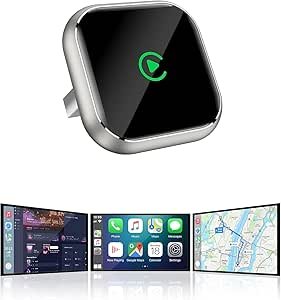
Wireless CarPlay Adapter: Upgrade Your Ride with Cable-Free Connectivity
A wireless CarPlay adapter is a small plug-and-play device that lets you use Apple CarPlay in your car without a USB cable. Instead of connecting your iPhone with a cable every time you get in the car, a wireless CarPlay adapter automatically pairs your phone to your vehicle’s infotainment system — giving you the convenience of hands-free calls, navigation, music, messages, and more with zero cables.
Whether you’re commuting, road-tripping, or just running errands, this adapter makes CarPlay easier and more seamless.
What Is a Wireless CarPlay Adapter?
A wireless CarPlay adapter connects to your car’s USB port where you would normally plug in your iPhone. Once installed, it converts wired CarPlay into wireless CarPlay by creating a Bluetooth or Wi-Fi connection with your phone.
After the initial setup, your phone pairs automatically whenever you start your car — so there’s no need to plug or unplug your device every time you enter or exit the vehicle.
How Wireless CarPlay Works
- Plug the Adapter into the Car’s USB Port
Most cars with CarPlay support have a USB port labeled with a phone or CarPlay icon. The adapter connects here. - Pair with Your iPhone
On first use, open Bluetooth/Wi-Fi settings on your iPhone and connect to the adapter. - Automatic Reconnect
Once paired, the adapter remembers your phone. The next time you start the car, CarPlay connects wirelessly without any user action. - Use CarPlay As Usual
You access navigation (Maps, Waze), music (Apple Music, Spotify), messages, and voice commands (Siri) just like normal wired CarPlay — only without the cable.
Benefits of Using a Wireless CarPlay Adapter
No More Cables
Forget fumbling with cords every time you get in the car — your iPhone connects automatically and wirelessly.
Reduced Wear & Tear
Less plugging and unplugging protects your phone’s charging port and your car’s USB port from damage.
Easier Access to Phone Functions
Enjoy hands-free navigation, calls, messages, and music with Siri or touchscreen control — all without reaching for a cable.
Clean, Minimal Setup
A wireless connection helps keep your car interior tidy and uncluttered.
Quick Installation
Most adapters work right out of the box — just plug in and pair.
What Features to Look For
When choosing a wireless CarPlay adapter, consider:
Compatibility
Make sure the adapter supports your car model, year, and CarPlay version.
Connection Type
Most use Bluetooth paired with Wi-Fi for faster data transfer and reliable CarPlay performance.
Automatic Pairing
Look for adapters that auto-connect without requiring the phone to reconnect manually each time.
Size and Design
Compact adapters don’t block adjacent ports or get in the way of charging or other accessories.
Firmware Updates
Adapters with update support allow improvements and new feature additions over time.
How to Install a Wireless CarPlay Adapter
- Locate Your Car’s CarPlay USB Port — Usually marked with a phone or CarPlay icon.
- Plug in the Adapter — It fits directly into the USB port.
- Turn on Your Car — This powers the adapter.
- Pair Your iPhone — Use Bluetooth and follow on-screen prompts for Wi-Fi setup if required.
- Test CarPlay — Once connected, CarPlay should launch automatically.
Installation usually takes just a few minutes and doesn’t require tools or professional help.
Tips for Best Performance
- Keep your iPhone in the front seat area for a strong wireless signal.
- Turn on Bluetooth and Wi-Fi on your phone before entering the car.
- Keep firmware of the adapter up to date if updates are available.
- Avoid using old USB ports that may not provide adequate power or data support.
Wireless CarPlay performance depends on both the adapter quality and the phone’s wireless signal strength.
Compatibility Notes
Wireless CarPlay adapters work only with cars that already have wired Apple CarPlay support. If your car does not support CarPlay with a cable, an adapter alone won’t enable it.
Cars that support Android Auto usually have similar wireless adapter options for Android users as well.
Closing Summary
A wireless CarPlay adapter brings convenience and simplicity to your in-car experience by eliminating cables and automating smartphone connectivity. With easy installation, automatic pairing, and a seamless connection every time you drive, it’s a popular upgrade for Apple users who want cable-free CarPlay without replacing their factory stereo system.
*Disclosure: As an Amazon Associate, this website may earn a commission from qualifying purchases at no additional cost to you.*
