
Quiet Gaming Keyboard
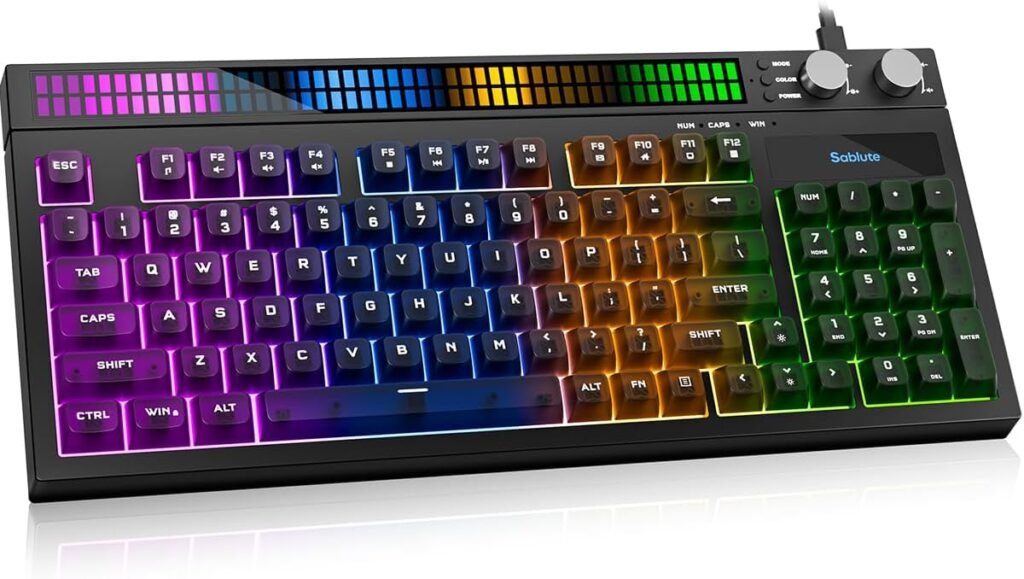
Quiet Gaming Keyboard: Performance Without the Noise
A quiet gaming keyboard is a specialized keyboard designed to deliver responsive, precise input while minimizing the audible noise typically associated with mechanical key presses. For gamers who want performance without loud clicks, or for shared spaces where noise matters — like late-night sessions, shared rooms, or streaming setups — a quiet gaming keyboard offers the best of both worlds: excellent gameplay performance and a more peaceful typing experience.
This guide covers what a quiet gaming keyboard is, how it works, the benefits it offers, key features to look for, and how to choose the right one for your setup.
What Is a Quiet Gaming Keyboard?
A quiet gaming keyboard is built to reduce typing and key-press sounds while maintaining or enhancing gaming performance. Traditional mechanical keyboards — especially with clicky switches — can be loud, which some gamers enjoy for tactile feedback but others find disruptive. Quiet keyboards use silent switches, dampened mechanisms, or membrane technologies to keep noise to a minimum without sacrificing responsiveness.
Some models are fully mechanical with silent or linear switches, while others use hybrid mechanisms or rubber dome designs optimized for quiet operation. Many also include RGB lighting, programmable keys, and gaming features tailored to competitive play.
Why Choose a Quiet Gaming Keyboard?
Noise Control for Shared Spaces
If you live with roommates, family members, or pets, a quiet gaming keyboard enables long sessions without generating disruptive key-clatter.
Better Focus
Reduced noise helps some players concentrate better during long gaming or work sessions, especially in strategy or immersive titles where focus is key.
Ideal for Streaming
Streamers who record audio while playing avoid keyboard noise bleeding into their mic, producing cleaner sound for viewers.
Comfortable Everyday Typing
Quiet keyboards often provide a smoother, softer feel that’s pleasant for both gaming and extended typing sessions.
Suitable for Night Use
Gaming late at night becomes courtesy-friendly when your keyboard doesn’t chime loudly with every press.
Key Technologies That Make Them Quiet
Silent or Linear Mechanical Switches
Many “quiet” mechanical keyboards use silent linear switches — switches designed to be smooth and responsive without audible click sounds. These are often found in top gaming models from brands that tailor switches for quiet operation.
Membrane or Hybrid Designs
Membrane keyboards inherently produce less noise than traditional mechanical keyboards. Hybrid or scissor mechanisms further enhance quietness while retaining decent responsiveness.
Built-In Dampening
Some keyboards include sound-absorbing layers, O-rings, or silicone pads to reduce key bottoming noise and soften each keystroke.
Low-Profile Keys
Low-profile switches and keys can reduce travel distance and noise while offering faster actuation — ideal for fast gameplay.
Important Features to Look For
1. Switch Type and Sound Profile
Look for keyboards with silent or linear switches specifically labeled for quiet operation. Avoid tactile switches with loud clicks if noise is a priority.
2. Build Quality
A solid frame reduces unwanted vibrations and rattles. Metal or reinforced plastic top plates help improve feel and stability.
3. Backlighting and Customization
RGB lighting and programmable effects enhance the gaming experience without adding noise. Many keyboards let you adjust lighting per game or profile.
4. Programmable Keys and Macros
For gamers who use complex commands, macro keys and customization software elevate performance.
5. Connectivity Options
Wired USB provides consistent low-latency input. Some models also offer wireless modes (Bluetooth or 2.4 GHz dongles) for clutter-free setups.
6. Ergonomics and Comfort
Detachable wrist rests, adjustable feet, and keycap design contribute to extended comfort, which matters for both gaming and typing.
How Quiet Gaming Keyboards Compare
| Feature | Quiet Gaming Keyboard | Standard Mechanical Keyboard |
|---|---|---|
| Noise Level | Very Low | Medium–High |
| Responsiveness | High | Very High |
| Typing Feel | Smooth/Soft | Clicky/Tactile |
| Best For | Shared spaces, streaming | Competitive gaming, tactile feedback |
| Durability | High | Very High |
Both types have their place — quiet keyboards balance performance and courtesy, while traditional mechanical keyboards favor clicky feedback for some gamers.
Everyday Uses Beyond Gaming
A quiet gaming keyboard isn’t just for games:
- Work and Productivity: Quiet typing helps in offices or shared workspaces.
- Streaming and Recording: Minimizes background noise on recordings.
- Study and Focused Tasks: Low noise reduces distractions during study sessions.
- Nighttime Use: Friendly for late-night work or play without disturbing others.
Tips for Best Setup and Use
- Use Desk Mats: A desk mat or keyboard pad reduces vibrations and improves sound absorption.
- Customize Lighting: Softer lighting can reduce visual distraction and enhance focus.
- Adjust Software Profiles: Many keyboards allow game-specific profiles to optimize key response.
- Maintain Clean Keycaps: Dust and debris can alter key feel and noise; regular cleaning helps performance.
Caring for Your Quiet Keyboard
- Clean Keycaps Regularly: Remove keycaps occasionally to clean between keys.
- Store Properly: Keep covered or in a drawer when not in use to prevent dust buildup.
- Avoid Spills: Liquids can damage internal components; use keyboard covers if needed.
In Closing
A quiet gaming keyboard is an excellent choice for gamers and everyday users who want responsive performance without the noise typically associated with traditional mechanical keyboards. With silent switches, sound-dampening design, customizable lighting, and ergonomic features, these keyboards enhance both comfort and gameplay — all while keeping your environment peaceful. Whether for competitive play, late-night sessions, or shared spaces, a quiet gaming keyboard delivers precision, comfort, and silent power for modern computing needs.
*Disclosure: As an Amazon Associate, this website may earn a commission from qualifying purchases at no additional cost to you.*
