
Magnetic Privacy Filter for MacBook
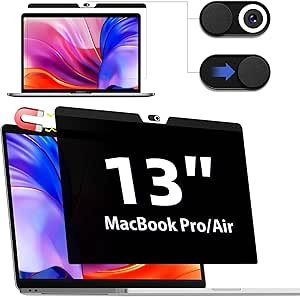
The Ultimate Magnetic Privacy Filter for MacBook Pro 13: Protect Your Privacy and Screen
In today’s digital world, privacy is more important than ever. Whether you’re working from a café, traveling on a plane, or simply using your MacBook Pro 13 in public spaces, protecting your screen from prying eyes is crucial. A magnetic privacy filter for your MacBook Pro 13 is the perfect solution to ensure your data remains secure and your viewing experience is not interrupted by onlookers.
In this guide, we’ll dive into what a magnetic privacy filter is, the benefits it offers, and recommend some of the best products available for your MacBook Pro 13.
What is a Magnetic Privacy Filter for MacBook Pro 13?
A magnetic privacy filter is an easy-to-install screen protector that adheres to the surface of your MacBook Pro 13’s display. The filter uses magnetic strips along the edges to securely attach to the screen, offering a perfect fit without the need for adhesive. Its primary function is to prevent people from viewing your screen from an angle, ensuring that only the person directly in front of the laptop can see the content clearly.
These privacy filters use a special polarized lens technology to block the screen’s view from side angles. As a result, anyone sitting beside or behind you will only see a darkened or blurred screen, protecting your sensitive information from prying eyes.
Benefits of Using a Magnetic Privacy Filter
- Enhanced Privacy in Public Spaces:
- The most obvious benefit of a magnetic privacy filter is the added privacy it provides. Whether you’re working on confidential documents, emailing clients, or watching a video, the filter ensures that no one can easily spy on what you’re doing. This is especially useful when you’re in crowded areas like coffee shops, airports, or public transportation.
- No Adhesive Required:
- Unlike traditional screen protectors that require sticky adhesives, magnetic privacy filters are easy to install and remove without leaving residue behind. The magnetic strips around the edges of the filter securely attach to your MacBook Pro 13’s screen, making installation a breeze.
- Screen Protection:
- Many magnetic privacy filters offer additional screen protection against scratches, smudges, and dust. While not as protective as tempered glass screen protectors, they still provide a layer of defense against minor damage that can occur during daily use.
- Reduced Eye Strain:
- Some privacy filters come with an anti-glare feature, which reduces the amount of light reflecting off the screen. This can make it easier to view your display, especially in bright environments, and also helps reduce eye strain during long hours of use.
- Improved Focus and Productivity:
- With the added privacy, you can work or watch content in public without worrying about distractions or people peeking over your shoulder. This can lead to improved focus, productivity, and peace of mind, especially when dealing with sensitive information or presentations.
- Reversible and Removable:
- Magnetic privacy filters are easily removable and reversible. When you’re working from home or in a private setting, you can simply take off the filter for full-screen visibility. This flexibility makes it a versatile option for those who want privacy without permanent screen modifications.
Features to Look for in a Magnetic Privacy Filter for MacBook Pro 13
When shopping for a magnetic privacy filter, you’ll want to consider the following features to ensure you get the best product for your needs:
- Perfect Fit for MacBook Pro 13:
- Make sure the privacy filter is designed specifically for your MacBook Pro 13. A well-fitted filter will cover the entire screen without leaving gaps around the edges, ensuring full privacy protection.
- Viewing Angle:
- Privacy filters typically block views from a wide range of angles. Look for a filter that offers effective privacy at 30-60 degrees from the center of the screen, meaning that anyone who tries to look from the side will see a blacked-out or blurred screen.
- Screen Protection:
- Many privacy filters also serve as a screen protector, offering scratch and smudge resistance. Ensure that the filter you choose adds some level of protection to your screen while preserving the clarity and brightness of the display.
- Matte or Glossy Finish:
- Privacy filters come in different finishes, usually matte or glossy. A matte finish reduces glare and offers a more subdued look, while a glossy finish may enhance screen clarity but could create more reflections. Choose the finish based on your preferences for glare reduction and display clarity.
- Blue Light Blocking:
- Some advanced privacy filters include blue light blocking technology, which can help reduce eye strain by filtering out harmful blue light emitted by the screen. This is an excellent option for those who spend long hours working on their MacBook Pro 13.
- Easy Installation and Removal:
- Magnetic privacy filters are known for their easy installation and removal. Look for a filter with strong but easy-to-remove magnets that securely hold the filter in place but can be quickly detached when not needed.
Top Magnetic Privacy Filters for MacBook Pro 13
Here are some top-rated magnetic privacy filters for the MacBook Pro 13 that offer excellent privacy protection and additional features:
1. 3M Privacy Screen for MacBook Pro 13
Overview:
3M is a trusted brand in the privacy filter space, and their Privacy Screen for MacBook Pro 13 is one of the best options available. This filter provides excellent privacy protection by blocking side views, while also reducing glare and protecting your screen from scratches.
Key Features:
- Blocks side view at a 60-degree angle
- Reduces glare for more comfortable viewing
- Easy magnetic installation and removal
- Scratch and smudge-resistant surface
- Provides added screen protection
Why Choose It:
The 3M Privacy Screen is known for its high-quality build and reliable privacy protection. It’s a top choice for those who need enhanced privacy while working in public spaces.
2. Tech Armor Magnetic Privacy Screen for MacBook Pro 13
Overview:
Tech Armor offers a highly rated magnetic privacy screen for the MacBook Pro 13. It delivers full privacy protection by blocking views from 30 degrees on either side, ensuring that no one can see your screen unless they’re directly in front of it.
Key Features:
- Privacy protection from 30-60 degree angles
- Easy-to-install magnetic mounting system
- Anti-glare and anti-scratch coating
- Reduces blue light exposure
- Ultra-thin design that doesn’t affect screen clarity
Why Choose It:
Tech Armor’s privacy filter is a great option for those who need both privacy and additional screen protection. The anti-glare feature is perfect for working in bright environments.
3. Kensington Magnetic Privacy Screen for MacBook Pro 13
Overview:
Kensington is another trusted brand when it comes to privacy filters. Their Magnetic Privacy Screen for MacBook Pro 13 is designed to provide excellent privacy while reducing glare and protecting your screen from damage.
Key Features:
- Privacy filter blocks side views from up to 60 degrees
- Magnetic design for easy installation and removal
- Matte finish reduces glare and fingerprints
- Scratch-resistant surface for added protection
- Lightweight and slim design
Why Choose It:
The Kensington Magnetic Privacy Screen is a great all-around option, offering a balance of privacy protection, ease of use, and screen clarity. It’s a solid choice for professionals on the go who need privacy in public spaces.
4. Infiland Magnetic Privacy Screen for MacBook Pro 13
Overview:
Infiland offers a sleek magnetic privacy filter designed specifically for the MacBook Pro 13. This filter provides solid privacy protection, while its lightweight and easy-to-install design make it ideal for everyday use.
Key Features:
- Blocks side views up to 60 degrees
- Anti-glare coating reduces reflections
- Easy installation and removal with magnetic strips
- Ultra-thin design that does not affect screen brightness or clarity
- Lightweight and portable
Why Choose It:
If you’re looking for a budget-friendly magnetic privacy filter with excellent privacy features, the Infiland Privacy Screen is a great choice. It offers a solid combination of privacy, protection, and ease of use.
Conclusion
A magnetic privacy filter is an essential accessory for anyone using a MacBook Pro 13 in public spaces. Not only does it protect your sensitive information from prying eyes, but it also offers added benefits such as glare reduction and screen protection. Whether you’re working on confidential projects, browsing the web, or simply watching a movie in a crowded area, a privacy filter ensures that your screen remains visible only to you.
With the variety of options available, choosing the right privacy filter for your MacBook Pro 13 depends on your specific needs—whether it’s additional screen protection, glare reduction, or the ease of installation and removal. Consider the products listed above to find the perfect fit for your privacy and screen protection needs.
