
Wireless CarPlay Adapter
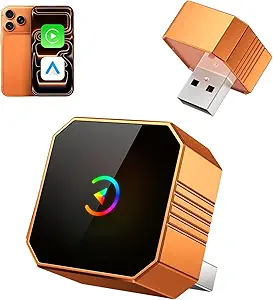
Wireless CarPlay Adapter: The Ultimate Guide to a Seamless Driving Experience
Apple CarPlay has revolutionized the way drivers interact with their smartphones while on the road, offering a safe and convenient way to access navigation, music, messages, and more directly from the car’s infotainment screen. However, traditional CarPlay connections usually require a wired USB connection, which can be cumbersome, especially when you’re constantly plugging and unplugging your phone. That’s where the Wireless CarPlay Adapter comes in.
A Wireless CarPlay Adapter allows you to connect your iPhone to your car’s infotainment system wirelessly, eliminating the need for cables and providing a more convenient and modern driving experience.
In this guide, we’ll explore what a Wireless CarPlay Adapter is, how it works, the benefits it offers, and the top products you should consider for a wireless connection to Apple CarPlay.
What is a Wireless CarPlay Adapter?
A Wireless CarPlay Adapter is a small device that allows you to connect your iPhone to your car’s infotainment system via Bluetooth and Wi-Fi, rather than through a wired USB connection. Once the adapter is plugged into your car’s USB port, it enables Apple CarPlay to work wirelessly, allowing you to access the features of your iPhone—such as navigation, music, messages, phone calls, and more—without needing to physically connect your phone to the car’s system with a cable.
These adapters are typically plug-and-play devices, meaning that once installed, they automatically sync with your iPhone when you enter your car, creating a seamless experience.
How Does a Wireless CarPlay Adapter Work?
The Wireless CarPlay Adapter works by converting the wired connection of Apple CarPlay into a wireless connection. Here’s how it generally works:
- Plug in the Adapter: The adapter is inserted into the car’s USB port, which is typically where you would connect your iPhone with a cable for CarPlay. This allows the adapter to interface with your car’s infotainment system.
- Pair with Your iPhone: Once the adapter is plugged in, you will need to pair your iPhone with the device via Bluetooth. After pairing, the adapter will use Wi-Fi to establish a wireless connection between your iPhone and the car’s infotainment system.
- Automatic Connection: After the initial setup, the adapter will automatically connect to your iPhone every time you enter the car, so you don’t have to worry about plugging in your phone. Your phone’s screen will appear on the car’s infotainment system, and you can start using Apple CarPlay wirelessly.
Benefits of Using a Wireless CarPlay Adapter
1. Eliminates the Need for Cables
- The biggest advantage of using a Wireless CarPlay Adapter is the elimination of tangled or misplaced cables. With this setup, you no longer need to physically connect your iPhone to the car’s USB port, reducing cable clutter and providing a cleaner, more organized look inside your vehicle.
2. Seamless Connection
- Wireless CarPlay adapters offer a seamless experience. Once set up, your iPhone will automatically connect to your car’s infotainment system each time you enter the vehicle. This makes the process of using Apple CarPlay much quicker and more convenient compared to the time spent plugging in a cable.
3. More Freedom in the Car
- Without the constraint of a cable, you have more freedom of movement in the car. You can easily use your phone for navigation or control music, all while keeping your phone in your pocket or bag. This also prevents the cable from getting in the way during driving.
4. Better Aesthetics
- Many drivers prefer a clean, cable-free dashboard. Wireless CarPlay allows for a more polished, modern look inside your vehicle since there are no cables hanging from the USB port, providing a more aesthetically pleasing environment.
5. Enhanced Convenience
- With wireless CarPlay, you can easily switch between devices without the need to unplug and replug cables. If more than one person uses the car’s infotainment system, switching between phones is quick and easy. No more fumbling with cables or worrying about tangled cords.
How to Set Up a Wireless CarPlay Adapter
Setting up a Wireless CarPlay Adapter is usually a simple process. Here’s how to do it:
1. Check Compatibility
- Before purchasing a wireless CarPlay adapter, check whether your vehicle and infotainment system are compatible with wireless CarPlay. Many newer vehicles come with built-in wireless CarPlay, but older vehicles may only support wired connections.
- You will also need an iPhone running iOS 9 or later, as this is the minimum required to support Apple CarPlay.
2. Plug in the Adapter
- Insert the wireless CarPlay adapter into your car’s USB port where you would normally connect your iPhone with a cable. In some vehicles, the USB port specifically labeled for CarPlay should be used.
3. Pair with Your iPhone
- Turn on your car’s infotainment system and follow the on-screen instructions to connect your iPhone via Bluetooth. Once paired, the system should recognize the adapter and prompt you to connect via Wi-Fi.
4. Enjoy Wireless CarPlay
- After pairing and connecting, your CarPlay interface will automatically appear on your car’s screen. You can now start using navigation, music, and other Apple CarPlay features wirelessly, without needing to plug in your phone.
What to Look for in a Wireless CarPlay Adapter
When choosing a wireless CarPlay adapter, there are several factors to consider to ensure you get the best product for your needs:
1. Compatibility
- Vehicle Compatibility: Not all vehicles are compatible with wireless CarPlay. Check if your car supports wireless CarPlay or if it only supports the wired version. Many older models of cars with Apple CarPlay may not have wireless capability, but an adapter can still help.
- iPhone Compatibility: Your iPhone needs to be running iOS 9 or later for Apple CarPlay to work. Most modern iPhones will support CarPlay.
2. Ease of Setup
- Look for a plug-and-play device that is easy to set up without requiring complicated configurations or technical knowledge. The best wireless CarPlay adapters offer easy pairing and automatic reconnection each time you get into your vehicle.
3. Performance and Stability
- The adapter should provide a stable wireless connection with minimal lag. Check reviews to see how well the adapter works in terms of stability, sound quality, and responsiveness. A good adapter should offer seamless performance without frequent disconnections or interruptions.
4. Size and Design
- Opt for an adapter that has a compact design so it doesn’t interfere with the rest of your dashboard. The last thing you want is a bulky device taking up too much space or getting in the way of other important functions in your car.
5. Price
- Wireless CarPlay adapters vary in price, so make sure you choose one that fits your budget while still offering the features you need. While some budget adapters work well, it’s often worth paying a little extra for better performance and reliability.
Top Wireless CarPlay Adapters to Consider
- CPLAY2air Wireless CarPlay Adapter
- Features: Plug-and-play setup, automatic connection, and support for both wired and wireless CarPlay. Compatible with most vehicles that support CarPlay.
- Best for: Those looking for a reliable and easy-to-use wireless CarPlay adapter.
- Carlinkit 3.0 Wireless CarPlay Adapter
- Features: Fast and stable connection, no lag, easy installation, and compatibility with most cars and iPhones.
- Best for: Users who want a budget-friendly option without compromising on quality.
- Naviks Wireless CarPlay Adapter
- Features: Bluetooth + Wi-Fi support, automatic connection, and compatibility with most vehicles and iPhones. Designed for those looking for a premium wireless experience.
- Best for: People who want a premium solution for their vehicle’s infotainment system.
- JungoLink Wireless CarPlay Dongle
- Features: Advanced connection technology for stable performance, compatible with most vehicles and iPhones, and compact design.
- Best for: Users seeking a high-performance, no-frills wireless CarPlay adapter.
Conclusion
A Wireless CarPlay Adapter transforms your in-car experience by eliminating the hassle of cables and offering a seamless, wireless connection between your iPhone and your car’s infotainment system. The convenience of not having to plug in your phone every time you get into the car makes driving more enjoyable and less cluttered. With a range of adapters on the market, you can find the one that works best for your vehicle and personal preferences. Whether you’re looking for easy installation, reliable performance, or affordable pricing, there’s a wireless CarPlay adapter that will meet your needs.
