
Wireless carplay adapter
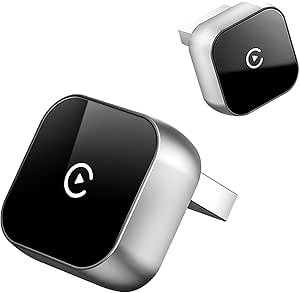
Wireless CarPlay Adapter — Upgrade Your Drive with Cordless Smartphone Integration
A wireless CarPlay adapter lets you use Apple CarPlay without a USB cable, transforming your vehicle’s infotainment experience. With this adapter, you can enjoy hands‑free navigation, calls, messages, music, and more — all wirelessly via Bluetooth and Wi‑Fi connection from your iPhone to your CarPlay‑enabled head unit.
Whether you’re tired of tangled cables or want the convenience of seamless connectivity every time you get in the car, a wireless CarPlay adapter is a practical accessory that modernizes your driving experience.
What Is a Wireless CarPlay Adapter?
A wireless CarPlay adapter is a small plug‑and‑play device that connects to your car’s existing USB port (where you normally plug in for wired CarPlay). Once connected, it enables wireless communication between your iPhone and the car’s infotainment system.
Instead of having to plug in your phone each time, your iPhone automatically pairs and launches CarPlay when you enter the vehicle and open the car door — no cables required.
Key Benefits
| Benefit | Why It Matters |
|---|---|
| Cable-Free Convenience | No more plugging and unplugging every trip |
| Automatic Connection | Connects wirelessly when you start the car |
| Supports Navigation | Maps, traffic, and directions on your car display |
| Hands‑Free Communication | Calls, texts, and messages without distraction |
| Music & Apps on the Go | Spotify, Apple Music, podcasts & more |
How It Works
- Plug Adapter into USB Port
Connect the wireless CarPlay adapter to the USB port used for CarPlay. - Pair with Your iPhone
Your iPhone will connect to the adapter via Bluetooth and Wi‑Fi. - Launch CarPlay Automatically
Once paired, CarPlay opens automatically, displaying your apps and interface on the car screen. - Wireless Streaming & Control
Use Siri or touch controls for navigation, calls, messages, and music without a cable.
Compatibility & Setup Requirements
| Requirement | Notes |
|---|---|
| Car Model | Must support Apple CarPlay (wired) |
| iPhone | iPhone 5 or later with iOS 9+ |
| USB Port | Available port used for wired CarPlay |
| Initial Pairing | Bluetooth + Wi‑Fi setup required once |
Most wireless CarPlay adapters work with factory infotainment systems that already support CarPlay — they do not replace your car’s head unit.
Everyday Usage Scenarios
- Daily Commutes — Get directions and music hands‑free without plugging in.
- Ride‑Sharing & Delivery — Keeps your phone accessible without distractions.
- Family Trips — Passengers can control media or directions easily.
- Driver Safety — Stay focused with voice control and auto launch.
Tips for Best Performance
- Keep iOS Up to Date — Ensures compatibility with the latest CarPlay features.
- Pair Once, Connect Always — After the initial setup, your phone reconnects automatically.
- Stable USB Connection — Ensure the adapter slot isn’t loose or obstructed.
- Avoid Interference — Wi‑Fi and Bluetooth work best with minimal nearby interference.
Specifications Overview
| Specification | Typical Details |
|---|---|
| Connection | Bluetooth + Wi‑Fi |
| Compatibility | Apple iPhone with CarPlay |
| Power Source | USB port in car |
| Auto Connect | Yes (after first pairing) |
| Setup Time | 1–3 minutes initial pairing |
| Wireless Range | Car interior range (Bluetooth/Wi‑Fi) |
Wireless CarPlay adapters deliver a modern and convenient driving experience by eliminating cables while maintaining full access to CarPlay features like navigation, calls, and media. With easy plug‑and‑play setup and automatic connection, they make every trip smoother and more connected.
Disclaimer: This article contains affiliate links. Purchases made through these links may earn a small commission at no extra cost to you.
