
Triple Monitor Wall-Mount
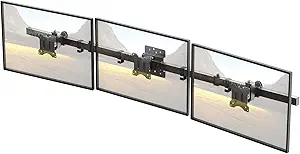
Triple Monitor Wall-Mount – Complete Buying Guide & ReviewTriple Monitor Wall-Mount aaj ke modern workspaces, home offices aur gaming setups mein bohot popular accessory ban chuka hai. Agar aap apni 3 monitors ko ek hi jagah par secure, ergonomic aur space-saving tareeke se mount karna chahte hain, to Triple Monitor Wall-Mount best solution hai. Is blog mein hum is product ke features, benefits, installation tips aur buying guide ko detail se discuss karenge — taake aap confidently aur informed decision le sakein.—Triple Monitor Wall-Mount Kya Hai?Triple Monitor Wall-Mount ek heavy-duty mounting solution hota hai jo teen monitors ko wall par securely mount karne ke liye design kiya gaya hai. Ye mount generally adjustable arms ke saath aata hai jisse monitors ko tilt, swivel aur height adjust kiya ja sakta hai.—Triple Monitor Wall-Mount Ke FaydeSpace Saving Setup: Desk par clutter kam hota hai, aur workspace zyada organized lagta hai.Ergonomic Positioning: Monitors ko ideal height aur angle pe set karke neck/eye strain kam kiya ja sakta hai.Improved Productivity: Multiple screens se workflow zyada efficient hota hai.Clean Aesthetics: Wall-mounted setup modern aur professional look deta hai.—Triple Monitor Wall-Mount Ke Main FeaturesFeature BenefitAdjustable Arms Monitors ko tilt/swivel/rotate karna easyVESA Compatibility Popular monitor mounting standard supportSturdy Construction Heavy loads ko safely supportCable Management Wires organized aur tidy rehte hainEasy Installation Quick setup with included hardware—VESA Compatibility GuideTriple Monitor Wall-Mount choose karte waqt VESA mount standard bohot important hota hai. Zyada tar monitors 75x75mm ya 100x100mm VESA holes ke saath aate hain, lekin higher resolutions ya large screens ke liye 200x200mm bhi common hai.VESA Pattern Compatible Monitor Sizes75x75 mm Up to ~27″ monitors100x100 mm Up to ~32″ monitors200x200 mm Larger gaming / productivity screens> Hamesha ensure karein ke aapke monitors ka VESA pattern jo mount support karta hai uske saath match ho.—Wall-Mount Construction & MaterialTriple Monitor Wall-Mount metal alloys — usually steel ya aluminum — se bana hota hai jo strong aur durable hota hai. High-grade build quality se mount heavy monitors ko securely support karta hai, bina kisi wobble ke.—Installation Process OverviewStep-by-Step Installation:1. Wall Location Choose Karein:Stud (wood/metal beam) locate karein, jahan mount secure hoga.2. Drill Holes & Attach Mount Plate:Mount plate ko wall ke sath secure karein using screws/anchors (provided).3. Attach Arms & Monitor VESA Plates:Arms ko mount plate ke sath fix karein aur phir monitors ke VESA plates attach karein.4. Adjust Height/Angle:Monitors ko ergonomic position mein set karein using adjustable arms.5. Cable Management:Cables neatly route karein through clips/channels provided with the mount.Is process se aapka setup neat, secure aur professional ban jayega.—Triple Monitor Wall-Mount TypesType Description Best ForFixed Wall Mount Monitors static position Clean and simple setupsArticulating Mount Full movement — swivel, tilt, pull-in/out Dynamic workspaceGas-Spring Mount Smooth adjustable motion Frequent repositioningHeavy-Duty Adjustable Large monitors up to 32–40″ High-performance use—Ideal Monitor Sizes & Weight SupportTriple Monitor Wall-Mount ke sath monitors choose karte waqt size aur weight support bohot important hai. Zyada tar mounts:Monitor Size: Up to 27–32 inches (kabhi kabhi 40″ tak)Weight Support: Typically 8–15 kg per armEnsure karein ke total load mount specification ke andar ho.—Cable Management TipsProper cable management se aapka setup neat aur professional lagta hai:Cable ties aur clips use kareinWall channels ya raceways install kareinPower strip ko accessible location par rakhein—Price & Value ComparisonPrice Range Typical Features Recommended For$60 – $120 Standard fixed/adjustable mounts Budget setups$120 – $200 More adjustability, better build Frequent adjusters$200+ Premium articulating/gas-spring arms Professional / heavy screens—Triple Monitor Wall-Mount Ke Common Use CasesWork From Home Desks – Productivity boostGaming Stations – Immersive multi-screen experienceTrader/Developer Workstations – Data & coding efficiencyOffice Conference Rooms – Unified display setup—FAQ – Frequently Asked QuestionsQ: Kya triple monitor wall-mount har monitor size support karta hai?A: Nahi — mount ki design aur weight capacity ke mutabiq support vary karta hai. Always product specification check karein.Q: Kya installation difficult hota hai?A: Basic tools aur instructions ke sath installation simple hota hai, lekin accurate wall stud locate karna zaroori hai.Q: Cable management zaroori kyun hai?**A: Wires tangling aur messy look ko avoid karta hai, aur professional finish deta hai.—Comparison Table: Top FeaturesFeature ImportanceSturdy Construction Ensures monitor stabilityVESA Compatibility Fit with various monitor modelsAdjustable Arms Flexible positioningEasy Installation No professional help neededCable Management Clean & organized setup—DisclaimerThis article contains general informational content about Triple Monitor Wall-Mount products. As an Amazon Associate, we may earn from qualifying purchases made through affiliate links in this blog. Product prices, availability, and features may change at any time without prior notice. Always verify product details and compatibility on the official Amazon product page before making a purchase.
