
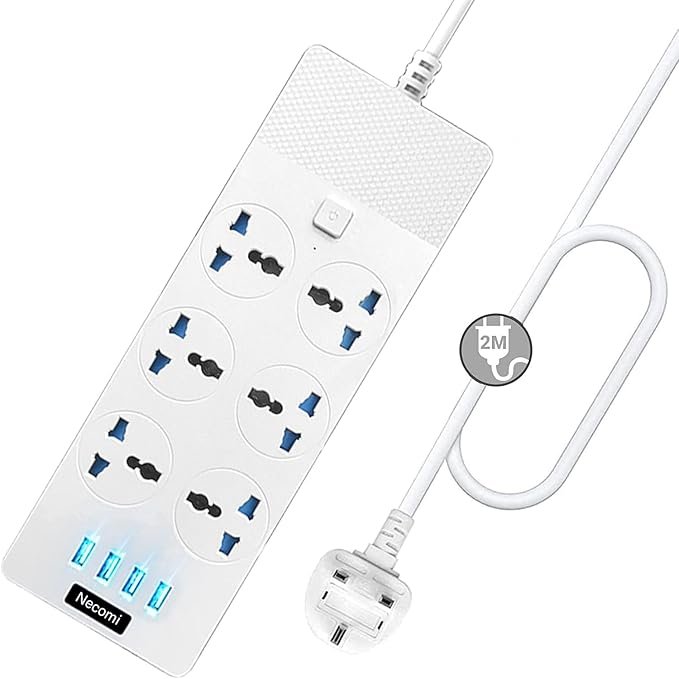
Power Extension (Extension Lead / Power Strip) — Complete Guide
A power extension (also called an extension lead, extension cord, power strip, or multi‑outlet extension) is a useful electrical accessory that expands a single wall socket into multiple outlets, allowing you to plug in several devices at once. Many modern units also include USB and USB‑C ports for charging phones, tablets and other small electronics without separate adapters.
What a Power Extension Does
A power extension typically provides:
- Multiple AC outlets so you can power several devices from one wall plug.
- Universal sockets that accept different plug types (in some models).
- USB and USB‑C charging ports for direct charging of mobile devices.
- Surge protection and safety features on higher‑end models to protect electronic equipment from voltage spikes.
Power extensions are commonly used in homes, offices, workstations, entertainment centres, workshops and classrooms.
Key Features to Look For
1. Number and Type of Outlets
- More outlets let you power more devices.
- Look for wide‑spaced outlets if you’re using large adapters or bulky plugs.
2. Built‑In USB / USB‑C Ports
- Useful for charging smartphones, tablets, smartwatches and other USB‑powered devices.
- USB‑C ports can support faster charging.
3. Surge Protection
- Protects connected devices from voltage spikes and power surges.
- Rated in joules; higher joule ratings generally offer more protection.
4. Safety Certifications
- Choose extensions with recognized safety marks (e.g., UL, ETL, CE) that indicate independent testing and compliance with electrical safety standards.
5. Cable Length
- Longer cables give you flexibility in placing devices further from the wall outlet.
- Avoid excessively long cords in small areas to reduce trip hazards.
6. Overload Protection
- Many models include circuit breakers or reset switches that cut power if too much current flows through.
7. Build Quality
- Flame‑retardant housing, grounded plugs and sturdy construction improve safety and durability.
Types of Power Extensions
Basic Power Strip
Provides several AC sockets, often with on/off switches.
Surge Protector Power Strip
Includes surge protection components to help protect sensitive electronics such as computers, TVs and gaming consoles.
USB / USB‑C Power Strip
Combines AC outlets and USB/USB‑C charging ports in one unit — good for desks and charging stations.
Heavy‑Duty Extension Lead
Built for higher current loads or tools in workshops — often thicker cable and more rugged housing.
Travel Power Strip
Compact size, sometimes with foldable plugs and universal socket designs for use in different countries (with appropriate adapters).
Safety Tips for Using Power Extensions
Do Not Overload
- Check the maximum amperage or wattage rating of the extension and ensure the total load of connected devices does not exceed it.
Plug Directly into Wall Outlets
- Do not plug an extension lead into another extension or into a multi‑adapter — this can overload the circuit.
High‑Wattage Appliances
- Avoid plugging heavy appliances (e.g., heaters, air conditioners, refrigerators, microwave ovens) into standard power strips — these should go directly into wall sockets.
Inspect Cords Regularly
- Look for frays, cuts, exposed wiring or loose plugs. Damaged extensions should be replaced immediately.
Keep Away from Water
- Do not use indoors near water sources unless the extension is specifically rated for wet locations.
Avoid Running Cables Under Carpets
- This can trap heat and increase fire risk.
Turn Off When Not in Use
- Using the on/off switch or unplugging helps reduce power waste and potential risk when devices are unused.
Example Power Extension Configurations
Here are a few typical configurations you might choose based on your needs:
Standard Power Extension
- 4–6 AC outlets
- On/off switch
- Short to medium cable
- Good for general home or office use
USB‑Enhanced Power Strip
- 4–6 AC outlets
- 2–3 USB ports (including USB‑C)
- Ideal for desks, bedside tables, entertainment units
Surge Protected Extension
- 6–8 AC outlets
- Built‑in surge protection (higher joule rating)
- Recommended for computers, TVs, routers and sensitive equipment
Heavy‑Duty Extension Lead
- Fewer outlets but thicker cable
- Designed for tools and appliances with higher current draw
Common Use Cases
- Computer workstations with monitors, printers and chargers
- Living room entertainment systems (TV, set‑top box, games, speakers)
- Kitchen counters for small appliances and USB charging
- Workshops and hobby areas (power tools, lamps)
- Bedrooms for lamps, clocks, phones and tablets
Summary
A power extension is an essential accessory when you need more outlets and charging options than a single wall socket provides. Look for models with the right number of outlets, USB/USB‑C ports if needed, surge protection, and safety certifications. Always use power strips correctly — don’t overload them, avoid high‑watt appliances on basic strips, and keep them in good condition for safe, reliable power distribution.
If you tell me what devices you plan to plug in and where you’ll use the extension (desk, living room, workshop, travel), I can suggest the best type and features for your specific setup.
