
Double Din Car Stereo
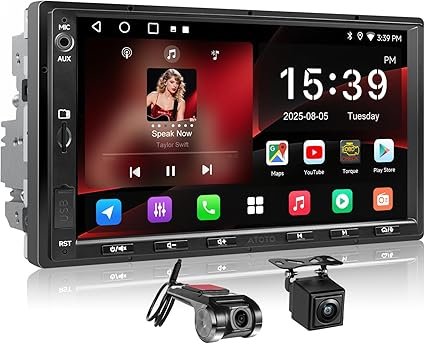
Double Din Car Stereo: The Complete Guide to Features, Benefits, and Choosing the Best Unit
Upgrading your car’s audio and infotainment system can dramatically improve your driving experience. A Double Din car stereo offers more functionality, better sound quality, and modern features compared to a factory radio. Whether you’re replacing an outdated unit or installing a new system, a double din stereo provides versatility, connectivity, and entertainment that keeps you connected on the road.
In this detailed guide, you’ll learn what a double din car stereo is, why it matters, key features to consider, how to install one, and tips for choosing the best model for your needs.
What Is a Double Din Car Stereo?
A double din car stereo refers to a head unit that fits a standardized 4” x 7” dash space (about twice the height of a single din unit). This larger size allows for bigger displays and more advanced features such as touchscreens, navigation, smartphone integration, and multimedia playback.
Because of the increased screen space, double din stereos often act as the central hub of the vehicle’s infotainment system, replacing the basic radio and CD players found in older cars.
Why Choose a Double Din Car Stereo?
Upgrading to a double din stereo offers several advantages over traditional single din units:
Improved Audio and Multimedia
With built‑in equalizers, support for high‑quality audio formats, and expanded connectivity options, double din stereos deliver richer sound and a more immersive listening experience.
Larger Display
The bigger screen makes it easier to control features such as navigation, media playback, and phone apps. Touchscreens simplify operation while you’re on the go.
Enhanced Connectivity
Modern double din units support:
- Bluetooth for hands‑free calls and wireless music
- USB input for charging and media playback
- Apple CarPlay and Android Auto support
- AUX input for external audio devices
Navigation and Smart Features
Many models include GPS navigation or support smartphone navigation via Apple CarPlay or Android Auto. You can also access voice assistants, message notifications, and apps safely while driving.
Backup Camera and Parking Assist
Double din stereos often support backup cameras, helping improve safety when reversing or parking.
Key Features to Look For
When selecting a double din car stereo, consider the following features:
Display Quality
Look for high‑resolution touchscreens for clear visuals and sharp menu graphics. Bright displays help with visibility in daylight.
Smartphone Integration
Apple CarPlay and Android Auto make it easy to use your phone’s navigation, messages, and music apps through the stereo interface.
Bluetooth Connectivity
Bluetooth allows hands‑free calling, wireless music streaming, and phonebook access. Multi‑device pairing is a plus.
Audio Output and Equalization
Built‑in equalizers and sound customization let you fine‑tune audio to match your preferences. Some units also support external amplifiers and subwoofers.
Navigation and GPS Support
Standalone GPS or support for smartphone GPS ensures you can get directions without relying solely on your phone.
USB and AUX Inputs
USB ports allow playback of stored music, charging of devices, and connection of external media. AUX ports provide alternative audio input for older devices.
Backup Camera Compatibility
Ensure the unit supports a backup camera input if you plan to install one. This enhances safety and convenience when reversing.
Installation Considerations
Installing a double din stereo may seem complex, but proper preparation makes the process smoother:
Check Your Vehicle’s Fit
Ensure your car’s dashboard supports double din units. Some vehicles may require a trim adapter or mounting kit to fit correctly.
Wiring Harness and Adapters
Use a compatible wiring harness adapter to connect the stereo to your car’s electrical system without cutting wires. Dash kits help secure the unit in place.
Antenna Adapter
An antenna adapter may be needed to retain radio functionality after installation.
Professional vs. DIY Installation
While many car enthusiasts install stereos themselves, professional installation ensures proper wiring, secure mounting, and optimal sound performance.
Benefits of Upgrading to a Double Din Car Stereo
- Better Entertainment: Stream music, watch videos, or play media from connected devices.
- Enhanced Connectivity: Bluetooth and smartphone integration make driving safer and more convenient.
- Modern Navigation: GPS and app‑based navigation help you find routes without distractions.
- Improved Safety: Support for backup cameras and hands‑free calling enhances driver awareness.
- Future‑Proof Features: USB, AUX, and app compatibility keep your system relevant.
Maintenance and Easy Tips
- Keep Software Updated: Some stereos allow firmware updates that improve functionality.
- Clean the Screen Gently: Use a soft, dry cloth to avoid scratches.
- Protect Against Heat: Park in shade when possible to avoid extreme dashboard temperatures.
- Check Connections Periodically: Loose wires can affect performance.
Conclusion
A double din car stereo transforms your vehicle’s entertainment and connectivity capabilities. With a larger display, advanced features like Bluetooth, smartphone integration, navigation support, and backup camera compatibility, these units offer a significant upgrade from basic factory systems.
By considering display quality, connectivity options, and compatibility with your vehicle, you can choose a double din stereo that meets your needs and enhances your driving experience. Whether you enjoy music, need reliable navigation, or want safer hands‑free communication on the road, a quality double din car stereo delivers performance, convenience, and modern features that elevate every journey.
