
Flash Drive
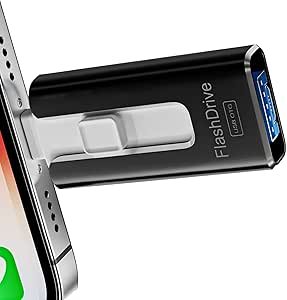
Flash Drive: The Ultimate Guide to Storage, Speed & Uses
In today’s digital world, having a reliable way to store and transfer data is essential. A flash drive is a compact, portable storage device that allows you to save, transport, and access files quickly. From school projects to work documents, photos, videos, and software, flash drives have become a staple for personal and professional use.
What Is a Flash Drive?
A flash drive, also known as a USB drive, pen drive, or thumb drive, is a small, portable storage device that uses flash memory to store data. It connects to a computer or other compatible devices via a USB port, allowing users to transfer files without an internet connection. Unlike external hard drives, flash drives have no moving parts, making them durable and resistant to physical damage.
Key Benefits of a Flash Drive
| Benefit | Description |
|---|---|
| Portability | Small and lightweight, easy to carry in pockets or bags |
| High-Speed Data Transfer | Supports fast file transfer depending on USB version |
| Durable & Reliable | Resistant to shock, dust, and minor drops |
| Plug-and-Play | Easy to use with most computers and devices |
| Versatile Storage | Can store documents, photos, videos, music, and software |
| No Internet Needed | Files can be accessed anytime, anywhere |
Types of Flash Drives
Flash drives come in various types to suit different needs:
| Type | Description |
|---|---|
| Standard USB 2.0 | Affordable, moderate speed, suitable for basic files |
| USB 3.0 / 3.1 / 3.2 | Faster data transfer, ideal for large files or videos |
| USB-C Flash Drives | Compatible with modern devices, reversible connector |
| Encrypted / Secure Flash Drives | Provides password protection for sensitive data |
| OTG Flash Drives | Works with smartphones and tablets for direct data access |
How to Choose the Right Flash Drive
When selecting a flash drive, consider the following factors:
| Factor | What to Consider |
|---|---|
| Storage Capacity | Ranges from 8GB to 1TB depending on your needs |
| Speed | USB 3.0 or higher is better for large files and videos |
| Compatibility | Ensure it works with your computer, laptop, or phone |
| Build Quality | Metal casings are more durable than plastic ones |
| Security Features | Important if storing sensitive or confidential data |
How to Use a Flash Drive
Using a flash drive is simple:
- Connect – Plug the flash drive into a compatible USB port.
- Transfer Files – Drag and drop files to or from your computer.
- Eject Properly – Always eject safely to avoid data corruption.
- Store Safely – Keep in a protective case to prevent physical damage.
Tips to Maintain Your Flash Drive
- Avoid dropping or exposing it to extreme temperatures.
- Do not remove the drive during file transfers.
- Regularly scan for viruses to prevent data loss.
- Backup important files to another storage medium for safety.
Conclusion
A flash drive is a convenient, portable, and versatile storage solution for anyone needing quick access to data. Whether for work, school, or personal use, it offers reliable performance, durability, and ease of use. Investing in a high-quality flash drive ensures your files remain safe and accessible wherever you go.
Disclosure: As an Amazon Associate, I earn from qualifying purchases.
