
Laptop screen extender
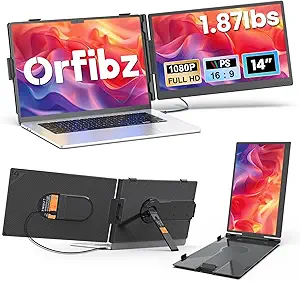
Laptop Screen Extender: Boost Your Productivity with an Extra Display
In today’s fast-paced world, multitasking is essential, especially when it comes to work or study. If you’re using a laptop for professional or educational purposes, you may have already realized the limitations of a single screen. That’s where a laptop screen extender comes into play.
A laptop screen extender is a portable device that allows you to extend your laptop’s display, providing you with a larger screen area for increased productivity. Whether you’re working from home, attending virtual meetings, or gaming, a laptop screen extender can help you manage multiple applications more effectively. In this post, we’ll explore why investing in a laptop screen extender is a smart move, and we’ll also cover some of the top options available in the market.
What is a Laptop Screen Extender?
A laptop screen extender is an external monitor that connects to your laptop, providing you with an additional screen to work on. These devices are compact and designed to be easily portable, making them ideal for people who need more screen real estate without the bulk of a traditional monitor.
Laptop screen extenders typically work by connecting via USB or HDMI to your laptop. Some extenders use plug-and-play technology, meaning no additional software or drivers are required, making them incredibly easy to set up and use. Once connected, the extender effectively increases your desktop space, allowing you to drag and drop windows, documents, or apps between the two screens.
Why Should You Invest in a Laptop Screen Extender?
1. Increased Productivity
One of the biggest advantages of a laptop screen extender is that it boosts your productivity. With an extra screen, you can have multiple applications open simultaneously—email on one screen, a document on another, and a video call on the third. This eliminates the need to constantly switch between tabs or apps, allowing you to complete tasks more efficiently.
2. Great for Multitasking
Whether you’re working on a project, researching, or managing a lot of data, having a second screen can help you stay organized. Instead of constantly minimizing and maximizing windows, you can have everything in full view, making it easier to multitask without losing track of important details.
3. Perfect for Remote Work and Virtual Meetings
If you’re working from home or attending virtual meetings, a laptop screen extender allows you to have a separate screen for your video calls. This way, you can keep your conference window open while still having access to other work documents, presentations, or resources without interrupting the flow of the meeting.
4. Enhanced Entertainment Experience
Laptop screen extenders aren’t just for work—they’re also great for entertainment. If you’re streaming movies, playing games, or editing videos, an extended display offers a more immersive experience. Having an additional screen means you can keep your media in full-screen mode while using the other screen for tasks like browsing, chatting, or social media.
5. Compact and Portable
Unlike traditional monitors, laptop screen extenders are compact and lightweight, making them easy to carry around. Whether you’re working from a coffee shop, co-working space, or traveling for business, you can easily take the extender with you and set up an efficient workspace anywhere.
Key Features to Consider in a Laptop Screen Extender
When shopping for a laptop screen extender, there are a few key features to keep in mind:
1. Connectivity Options
Laptop screen extenders typically connect to your laptop via USB-C, USB 3.0, or HDMI. USB-C is the most common, as it supports fast data transfer and can deliver both power and video signals. Make sure your laptop has compatible ports, or check if an adapter is needed.
2. Resolution and Display Quality
Look for an extender that offers at least 1080p Full HD resolution, which provides a clear, sharp image. Higher resolutions, such as 1440p or 4K, are also available if you need more screen detail, especially for tasks like graphic design or video editing.
3. Size and Portability
Laptop screen extenders come in different sizes, usually ranging from 12.5 inches to 17 inches. Smaller extenders are more portable, while larger ones offer a bigger workspace. Consider your portability needs and how much screen space you require for optimal productivity.
4. Weight and Thickness
The weight and thickness of the extender are also important for portability. A lightweight and slim design ensures you can carry the device with ease, especially if you travel frequently or work in various locations.
5. Adjustability and Mounting Options
Some extenders come with adjustable stands or mounting options that allow you to customize the angle of the screen. This can be helpful for ensuring you’re working at a comfortable viewing angle, especially during long working hours.
6. Compatibility
Before purchasing, check the compatibility of the extender with your laptop’s operating system (Windows, macOS, etc.). Most extenders are compatible with both platforms, but it’s always a good idea to verify to avoid compatibility issues.
Top Laptop Screen Extenders to Consider
Here are some of the best laptop screen extenders available on the market:
1. MOHARD 15.6-Inch Laptop Screen Extender
The MOHARD 15.6-Inch Laptop Screen Extender is a top choice for users who want a balance between portability and screen size. It connects via USB 3.0 or USB-C and offers 1080p HD resolution, making it perfect for multitasking, presentations, and entertainment. The extender is also lightweight, making it ideal for travel.
- Features: 15.6-inch display, full HD 1080p, USB-C and USB 3.0 connectivity, plug-and-play.
- Best For: Professionals, students, and travelers.
2. WIMAXIT 15.6-Inch Portable USB Monitor
The WIMAXIT 15.6-Inch Portable USB Monitor offers a high-definition display and a sleek, portable design. It comes with a USB-C port and provides 1080p resolution for clear and crisp images. The monitor also includes an adjustable stand for added convenience.
- Features: 15.6-inch screen, full HD resolution, USB-C and HDMI input, lightweight design.
- Best For: Work from home setups, presentations, and entertainment.
3. ASUS ZenScreen MB16AC 15.6-Inch Portable Monitor
The ASUS ZenScreen MB16AC is a slim, lightweight portable monitor that provides 1080p resolution. It’s compatible with both USB-C and USB 3.0, making it an excellent option for most laptops. The monitor also has a smart cover that doubles as a stand, which is perfect for on-the-go use.
- Features: 15.6-inch full HD, ultra-portable, USB-C and USB 3.0 compatibility, smart cover stand.
- Best For: Professionals, travelers, and people looking for a premium portable monitor.
4. AOC 16-inch Portable Monitor
The AOC 16-inch Portable Monitor is perfect for users who need a larger screen. It provides full HD resolution and uses USB-C for easy connectivity. The monitor is designed to be ultra-thin and portable, making it easy to take along with your laptop wherever you go.
- Features: 16-inch full HD screen, USB-C connectivity, ultra-thin design.
- Best For: Users who need a larger display without sacrificing portability.
5. Lepow 15.6-Inch Portable Monitor
The Lepow 15.6-Inch Portable Monitor features a USB-C and HDMI input, making it compatible with a wide range of devices. It offers 1080p resolution, and its slim design makes it easy to take on the go. This monitor is perfect for those who need an extra screen for multitasking, gaming, or entertainment.
- Features: 15.6-inch full HD, USB-C and HDMI inputs, slim and lightweight.
- Best For: Students, professionals, and gamers.
Conclusion: Maximize Your Laptop’s Potential with a Screen Extender
A laptop screen extender is an excellent investment if you need more screen space for work, study, or entertainment. Whether you need an extra display for productivity, multitasking, or enhancing your entertainment experience, these portable monitors provide a quick, easy solution. With a variety of sizes, resolutions, and features available, you can find the perfect extender to suit your needs.
