
MagicSuction Privacy Filter
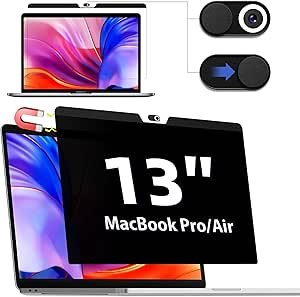
MagicSuction Privacy Filter for Apple MacBook Air 13: Enhance Your Privacy and Screen Protection
In today’s digital age, privacy is a top concern for many MacBook users. Whether you’re working on sensitive projects, browsing personal information, or just using your laptop in public spaces, ensuring that no one can see your screen is crucial. This is where a privacy filter comes into play, and the MagicSuction Privacy Filter for Apple MacBook Air 13 is one of the best solutions available for users seeking both privacy and screen protection in one.
In this detailed guide, we’ll explore what the MagicSuction Privacy Filter is, how it works, and why it’s the perfect accessory for your MacBook Air 13. We’ll also go over the benefits, installation process, and key features of this product to help you decide if it’s the right choice for you.
What is the MagicSuction Privacy Filter?
The MagicSuction Privacy Filter is a high-quality screen protector designed for the Apple MacBook Air 13. Its primary function is to safeguard your personal data from prying eyes by limiting the viewing angle of your screen. This means that only the person directly in front of the screen can see the content, while those standing or sitting beside you will see a darkened, obscured screen. This makes it perfect for users who frequently work in public places such as coffee shops, airports, or shared office spaces.
But the MagicSuction Privacy Filter is not just a privacy screen; it also doubles as a screen protector, guarding your MacBook Air’s display from scratches, dust, and fingerprints. It’s an all-in-one solution that combines privacy, protection, and usability.
How Does the MagicSuction Privacy Filter Work?
The MagicSuction Privacy Filter uses advanced micro-louver technology to ensure that your screen is only visible to the person directly in front of it. The louvered structure consists of micro thin layers that block light from any other angle. As a result, it provides effective privacy protection by reducing the viewing angle to about 30-60 degrees on either side, depending on the model.
When you look at your screen from the correct angle, it appears perfectly clear, just like any other display. However, when viewed from an angle, the screen will appear black or darkened, making it impossible for bystanders to view the content.
In addition to privacy, the MagicSuction Privacy Filter also protects the screen from dust, smudges, and minor scratches. This helps maintain your MacBook Air 13’s pristine condition over time, ensuring that your display stays clear and vibrant.
Key Features of the MagicSuction Privacy Filter for MacBook Air 13
Here are the standout features of the MagicSuction Privacy Filter that make it an excellent choice for your MacBook Air 13:
1. Effective Privacy Protection
The main feature of the MagicSuction Privacy Filter is its ability to prevent prying eyes from seeing your screen. Whether you’re working on confidential documents, emails, or personal projects, the MagicSuction filter ensures that your information stays private, even in crowded spaces. It provides a 60° horizontal viewing angle, which means anyone to the left or right of you will see a darkened screen, while you’ll still be able to view everything clearly.
2. Scratch and Smudge Protection
The filter acts as an additional layer of protection for your MacBook Air’s screen, helping to keep it safe from scratches, scuffs, and daily wear and tear. The MagicSuction Privacy Filter is made from high-quality materials that are durable and can withstand constant use, ensuring your display stays in top condition.
3. Anti-Glare Technology
Glare from ambient light can be a real issue when using your MacBook outdoors or in brightly lit rooms. The MagicSuction Privacy Filter is equipped with anti-glare technology, which reduces reflections and makes your screen easier to see, even in well-lit environments. This helps to improve your viewing experience by reducing eye strain.
4. Easy Installation and Removal
One of the best features of the MagicSuction Privacy Filter is its suction-based installation system. This unique system allows you to easily apply and remove the privacy filter without leaving any residue or damage on your screen. It’s designed for a hassle-free setup, and you can reposition the filter if necessary. No adhesives or tapes are required, making it an ideal solution for people who want flexibility in their setup.
5. High-Resolution Clarity
While the MagicSuction Privacy Filter offers privacy, it does not compromise your screen’s clarity. You’ll still enjoy full HD resolution and sharp text and images. Whether you’re watching videos, working on documents, or browsing the web, the filter preserves the quality of your MacBook’s display, so you won’t have to sacrifice performance for privacy.
6. Thin and Lightweight
The MagicSuction Privacy Filter is designed to be ultra-thin and lightweight, so it doesn’t add any bulk or weight to your MacBook Air 13. This ensures that your device remains sleek and portable, without compromising the look or feel of your laptop. The filter is specifically designed to match the dimensions of your MacBook, so it won’t affect the overall aesthetics.
7. Blue Light Filtering
Some versions of the MagicSuction Privacy Filter also feature blue light filtering technology. This helps reduce eye strain and fatigue, which is especially beneficial if you spend long hours on your laptop. Blue light blocking can be particularly useful when working late at night or using your MacBook for extended periods.
Benefits of Using the MagicSuction Privacy Filter for MacBook Air 13
Owning a MagicSuction Privacy Filter for your MacBook Air 13 comes with a number of benefits that go beyond just privacy protection:
1. Enhanced Security
By using a privacy filter, you prevent others from viewing your sensitive information while you’re working in public spaces. This added layer of security ensures that confidential data stays protected from prying eyes, which is essential for professionals and anyone who values their privacy.
2. Improved Productivity
With reduced distractions from people looking over your shoulder, you can focus more on your work. The filter ensures that you’re the only one who can view your screen, giving you peace of mind and improving your productivity in public places.
3. Convenience
Since the filter is easy to apply and remove, you can use it whenever you need extra privacy and remove it when you don’t. This makes it a flexible option for those who want privacy when necessary but don’t want to keep the filter on all the time.
4. Protects Your Display
The MagicSuction Privacy Filter not only protects your personal information but also helps preserve the condition of your MacBook’s screen. It shields the display from scratches, smudges, and dirt, keeping your laptop looking brand new.
5. Affordable Screen Protection
Compared to traditional screen protectors or privacy filters that require adhesives, the MagicSuction Privacy Filter offers a more affordable and less invasive way to protect both your screen and your privacy. It’s an investment that pays off by extending the lifespan of your MacBook and keeping your data safe.
How to Install the MagicSuction Privacy Filter for MacBook Air 13
Installing the MagicSuction Privacy Filter is quick and easy. Here’s a step-by-step guide:
- Clean Your Screen: Begin by wiping down your MacBook Air’s screen with a microfiber cloth to remove any dust, fingerprints, or dirt.
- Align the Filter: Carefully align the MagicSuction Privacy Filter with your screen. It should fit snugly over the display.
- Apply the Filter: Gently press the filter onto the screen. The suction technology will securely hold it in place without leaving any residue or damaging the surface.
- Adjust If Necessary: If the filter isn’t perfectly aligned, you can easily remove and reposition it as needed.
When you’re done, your MagicSuction Privacy Filter will stay in place and can be removed just as easily when you no longer need privacy protection.
Top Reasons to Choose the MagicSuction Privacy Filter
- Easy installation without any residue or adhesives.
- Enhanced privacy protection, perfect for public spaces.
- Durable and high-quality construction that also protects the screen from scratches.
- Anti-glare technology for better visibility in bright environments.
- Thin, lightweight design that doesn’t add bulk to your MacBook Air 13.
Conclusion
If you’re looking to enhance the privacy of your Apple MacBook Air 13 while also protecting its screen from scratches and smudges, the MagicSuction Privacy Filter is an excellent choice. With its advanced privacy features, anti-glare properties, and easy installation process, this filter offers both practicality and peace of mind.
Perfect for frequent travelers, professionals working in public places, or anyone who values their privacy, the MagicSuction Privacy Filter helps you work confidently and securely without worrying about prying eyes. It’s a must-have accessory for anyone who owns a MacBook Air 13 and wants to keep their data safe while maintaining a clean, clear screen.
