
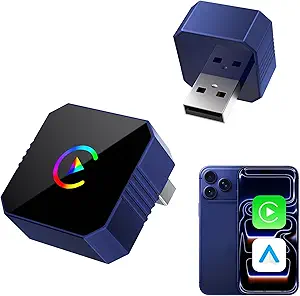
Here’s a clear overview of mini wireless CarPlay adapters for vehicles — compact devices that let you use Apple CarPlay without plugging in a cable (iPhone connects over Bluetooth/Wi‑Fi instead of a Lightning cable). Before you consider one, it’s important to know how they work and what to check.
What Is a Mini Wireless CarPlay Adapter?
A mini wireless CarPlay adapter is a small USB dongle that you plug into your car’s CarPlay‑compatible USB port. It replaces the need for a wired connection by using Bluetooth and Wi‑Fi to connect your iPhone to the car’s infotainment system automatically when you start the engine.
How It Works (in brief)
- Plug the adapter into the USB port your CarPlay normally uses.
- Pair your iPhone once via Bluetooth/Wi‑Fi.
- After setup, the phone connects automatically without cables every time.
Benefits
Cable‑free CarPlay
No need to plug in or remove a cable each time you drive.
Cleaner dashboard
Tiny adapters don’t stick out like bulky dongles.
Easy setup
Simple plug‑and‑play for most cars with wired CarPlay.
Things to Know Before You Buy
Only works with wired CarPlay cars
These adapters transform existing wired CarPlay into wireless — they don’t add CarPlay if your car doesn’t already support it.
Compatibility matters
Make sure the adapter supports your specific car model and iOS version. Not all small adapters work with every head unit.
Connection quality varies
Wireless CarPlay may sometimes have slight delays versus wired, though newer adapters use fast 5 GHz Wi‑Fi to reduce lag.
Popular Mini Wireless CarPlay Adapters
Here are some common adapters mentioned by reviewers and in recent buyer guides:
CarlinKit Mini 5 SE
A compact adapter that quickly converts wired CarPlay to wireless. Known for smooth connectivity and reliable performance after pairing.
Ottocast Mini Pico Wireless Adapter
Handles both wireless CarPlay and Android Auto in one device. Designed with a small, ergonomic shape and a side switch to toggle between paired phones.
CarlinKit 3.0 Mini
Mini version of the classic CarlinKit adapter — easy to set up, stays plugged in without cluttering the dashboard, and reconnects automatically.
Burnt Sugar Ultra Mini Adapter (Budget)
Very small, USB‑drive–like wireless CarPlay adapter with dual‑band Wi‑Fi and Bluetooth support — ideal if you just need basic CarPlay streaming.
Adapters With Android Auto Support
Some mini adapters also support Android Auto in addition to CarPlay, useful if different drivers use different phones. Examples include certain Ottocast and CarlinKit models.
How to Use a Mini Wireless CarPlay Adapter
- Plug it in – Insert into the USB port used for CarPlay.
- Pair your phone – Follow the on‑screen prompts for Bluetooth/Wi‑Fi pairing.
- Automatic connect – After the first setup, your iPhone should connect automatically whenever you get in the car.
Tips for Best Performance
- Use the car’s main USB CarPlay port (some cars have multiple USB ports).
- Turn Bluetooth and Wi‑Fi on before starting the car.
- Keep firmware updated if the adapter offers updates — this can improve compatibility and connection reliability.
Summary
A mini wireless CarPlay adapter is a simple way to upgrade your wired Apple CarPlay system to wireless convenience. They vary in size, speed, and compatibility, but top choices like CarlinKit Mini and Ottocast Mini Pico are compact and reliable, often reconnecting automatically after the first setup. Always check car and phone compatibility before buying to ensure a smooth experience.
If you want recommendations tailored to your car make/year and budget range, tell me those details and I can help you narrow it down!
