
Security Cameras
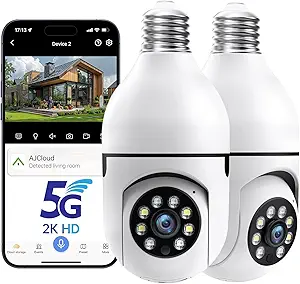
Security Cameras: Comprehensive Guide to Choosing and Using Camera Systems
Security cameras are electronic devices designed to monitor and record activity in and around homes, businesses, and public places. They serve as a deterrent to crime, help capture important video evidence, and provide peace of mind by allowing remote viewing of spaces that matter most. Whether you are protecting your property, monitoring children or pets, or supervising a workplace, understanding how security cameras work and what features to consider can help you choose the best solution for your needs.
What Are Security Cameras?
Security cameras, also known as surveillance cameras, are visual monitoring devices that capture live video footage. They can operate independently or as part of a broader security system. Depending on the type and setup, footage is recorded locally (on a DVR/NVR or memory card) or stored in the cloud, where it can be reviewed later.
Traditional camera systems were hardwired, but modern systems now include wireless options that connect via Wi-Fi or cellular networks, making installation and scalability easier.
How Security Cameras Work
Most security cameras function through a combination of hardware and software components:
- Lens and Image Sensor: The lens captures light, and the sensor converts it into digital video. Higher-quality sensors produce clearer footage, especially in low light.
- Processor and Encoding: Onboard electronics compress and prepare video for storage or transmission.
- Storage Options: Footage can be stored on local devices (DVR/NVR or microSD card) or uploaded to cloud storage.
- Connectivity: Wired systems use cables, while wireless cameras connect via Wi-Fi, Bluetooth, or cellular networks.
- Monitoring Interface: Users can view live or recorded footage via apps, computers, or dedicated security monitors.
When motion or audio is detected, smart cameras can send alerts to your phone or email, ensuring you are notified of significant activity in real time.
Types of Security Cameras
Security cameras come in several formats, each suited to a different purpose:
1. Dome Cameras
Named for their dome shape, these cameras are typically ceiling-mounted. They are discreet, vandal-resistant, and good for indoor surveillance.
2. Bullet Cameras
Featuring a longer, cylindrical shape, bullet cameras are usually installed on walls or ceilings to cover specific areas like driveways, entrances, or backyards.
3. PTZ Cameras (Pan-Tilt-Zoom)
PTZ cameras can be remotely moved horizontally (pan), vertically (tilt), and zoomed in or out. These are ideal for large areas where active monitoring is needed.
4. Wireless Cameras
These connect to your network without the need for video cables. Installation is more flexible, and many models are battery-powered or solar-assisted.
5. Hidden or Mini Cameras
Compact cameras that blend into the environment, often used for discreet monitoring. They can be disguised as everyday objects or installed in tight spaces.
6. IP (Internet Protocol) Cameras
IP cameras transmit video over the internet. They can be accessed remotely and often support high-resolution video, two-way audio, and intelligent alerts.
Key Features to Consider
When choosing security cameras, look at these important aspects:
Resolution and Image Quality
Resolution determines how detailed the footage is. Common options include:
- 1080p (Full HD): Clear for basic monitoring
- 2K / 4MP: Sharper detail for faces and license plates
- 4K UHD: High clarity for large areas or detailed evidence
Higher resolution is useful if you need clear identification in footage.
Night Vision Capability
Infrared (IR) or low-light technology allows cameras to record in darkness or low light conditions. Check how far the night vision reaches (measured in meters or feet).
Motion Detection and Alerts
Smart motion sensors trigger recording and send notifications only when activity occurs — conserving storage and focusing on important events.
Two-Way Audio
Built-in microphones and speakers let you listen and speak through the camera, useful for delivery interactions or deterring intruders.
Field of View
Wider fields of view capture more area. A wider lens is advantageous for outdoor areas, entrances, and large rooms.
Storage Method
Choose between local storage (NVR/DVR or SD card) or cloud storage. Cloud storage provides access from anywhere, while local storage avoids monthly fees.
Weather Resistance
For outdoor cameras, check the IP rating (higher numbers indicate better resistance to dust and water). An IP65 or above rating is typically recommended for harsh environments.
Installation and Placement Tips
Proper installation helps ensure reliable coverage and reduces blind spots:
- Front and Back Entrances: Place cameras to monitor key entry points.
- Driveways and Garages: Oversee vehicles and movement near your home.
- Ground-Level Windows: Cameras at common entry points improve security.
- High Corners: Mount cameras where they are difficult to tamper with but still capture clear lines of sight.
- Avoid Direct Sunlight: Position cameras to minimize glare, which can wash out footage.
When drilling or mounting, ensure secure fixtures and weatherproofing for outdoor cameras.
Benefits of Security Cameras
Installing security cameras delivers multiple advantages:
- Deterrence of Crime: Visible cameras discourage trespassing, theft, and vandalism.
- Evidence Collection: Recorded footage can be crucial for insurance claims or police investigations.
- Remote Monitoring: Apps and online access let you check your property from anywhere.
- Safety for Loved Ones: Cameras help you monitor children, elderly family members, or pets.
- Workplace Oversight: Helps manage employee safety and accountability.
Maintenance and Care
To keep your cameras reliable:
- Clean lenses periodically to remove dust, rain marks, or debris.
- Check connections and power sources for loose cables.
- Update firmware regularly to improve features and security.
- Test motion detection zones to ensure proper coverage.
Regular maintenance ensures you get clear footage and reliable performance over time.
Common Myths vs. Reality
Myth: Security cameras stop all crimes.
Reality: While cameras deter many crimes, they work best when combined with lighting, alarms, and secure locks.
Myth: Wireless cameras are less reliable.
Reality: High-quality wireless cameras with strong network signals perform as well as wired systems, with easier installation.
Final Thought
Security cameras are effective tools for monitoring, protecting, and managing your home or business. Whether you choose a basic model or a feature-rich smart system with remote access, the right cameras can improve safety, provide peace of mind, and deliver valuable insights into what happens on your property every day.
Disclosure: As an Amazon Associate, this website may earn a commission from qualifying purchases at no additional cost to you.
