
USB charger
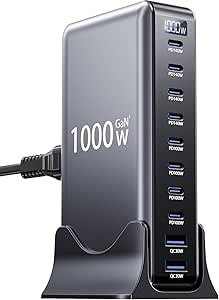
USB Charger — Powering Devices Simply & Safely
A USB charger is a device that supplies electrical power through one or more USB ports to recharge or power electronics such as smartphones, tablets, cameras, wireless earbuds, smartwatches, portable speakers, and more. With standardized USB connections, these chargers make it easy to power a wide range of devices using the same basic cable types like USB‑A, USB‑C, or variations of both.
USB chargers are available as wall adapters, car chargers, power banks, multi‑port hubs, or wireless units, depending on where you need power and how many devices you’re charging at once.
This guide covers what USB chargers are, how they work, key features, how to choose the right one, and practical tips for safe use.
What Is a USB Charger?
A USB charger converts electrical current from a power source (wall outlet, car outlet, or other) into low‑voltage USB power that can safely charge portable electronic devices. Most chargers include:
- USB ports (USB‑A, USB‑C, or both)
- Power conversion circuitry to regulate voltage/current
- Safety protections (overcharge, short‑circuit, over‑current)
Chargers vary by output power, number of ports, and supported charging standards.
How USB Charging Works
- Connect to Power: Plug the charger into a wall outlet, car socket, or external power source.
- Plug in USB Cable: Insert the USB cable into the charger and your device.
- Power Negotiation: Smart chargers and devices communicate to select the best charging rate.
- Charging Begins: Current flows into the device battery until it’s full or disconnected.
The power output determines how fast and efficiently a device charges.
Key Features to Consider
| Feature | Why It’s Important |
|---|---|
| Port Type (USB‑C/USB‑A) | Determines compatibility with devices |
| Output Power (Wattage / Amps) | Higher power = faster charging |
| Charging Standards | Quick Charge, Power Delivery, etc. for speed |
| Number of Ports | Charge multiple devices simultaneously |
| Safety Protections | Protects device and charger from damage |
| Compact Design | Easy to carry for travel or everyday use |
USB Port Types Explained
USB‑A
- Standard rectangular port
- Common in older chargers and cables
- Works with many devices with the right cable
USB‑C
- Newer, reversible connector
- Supports higher power and data speeds
- Best for modern phones, tablets, laptops
Many modern chargers include both USB‑A and USB‑C for wider compatibility.
Charging Standards & What They Do
| Standard | Benefit |
|---|---|
| USB Power Delivery (PD) | Fast and flexible charging up to high wattages |
| Qualcomm Quick Charge (QC) | Fast charging for many Android devices |
| Proprietary Fast Charge | Brand‑specific rapid charge (e.g., Samsung, Huawei) |
| Standard USB | Basic charging for everyday use |
Power Delivery (PD) is especially common with USB‑C ports and supports fast charging on many modern devices.
Output Power Guide
USB charger power is often shown in watts (W) or amps/volts (A/V):
| Power Level | Typical Use |
|---|---|
| 5–12 W | Small devices, slow charging |
| 18–30 W | Fast charging phones & tablets |
| 30–60 W | Laptops, larger devices (USB‑C PD) |
| 60+ W | High‑power laptops & portable monitors |
Higher wattage lets devices charge faster or supports charging high‑capacity batteries like laptops.
Types of USB Chargers
Wall Chargers
Standard chargers that plug into household outlets.
Best for everyday home or office use.
Car USB Chargers
Plug into a car’s 12V socket — ideal for travel and daily commute.
Multi‑Port Chargers
Include several USB ports (3, 4, or more) — excellent for families or multiple devices.
USB‑C Chargers with Power Delivery
Support fast charging for USB‑C devices and some laptops.
Travel USB Chargers with Plugs
Include interchangeable wall plugs for worldwide use.
Wireless USB Chargers (Qi)
Charge compatible devices without cables — just place the device on the pad.
How to Choose the Right USB Charger
1. Match Port Type to Device
- USB‑C for modern devices
- USB‑A for older chargers and accessories
2. Check Power Output
- Higher watt chargers for phones/tablets
- High‑watt USB‑C PD for laptops or larger devices
3. Multiple Ports
Useful if you charge more than one device at a time.
4. Safety Features
Look for over‑current/over‑voltage protection, temperature control, and certifications (CE, FCC, UL).
5. Portability
Smaller chargers and foldable plugs are ideal for travel.
Tips for Best Charging Performance
- Use high‑quality cables that match your device’s charging standard.
- Avoid cheap or uncertified chargers to protect your devices.
- For fast charging, ensure both charger and device support the same standard.
- Charge in cooler environments — extreme heat slows battery performance.
- Disconnect when fully charged to preserve battery health over time.
Common Questions
Can I use any USB charger with any device?
Yes, for basic charging — but for fast charging, both charger and device must support the same standard (PD, QC, etc.).
Why do some USB‑C chargers charge faster?
USB‑C chargers with Power Delivery can deliver higher wattage and negotiate with devices for faster charging without overheating.
Can I power multiple devices at once?
Yes — just ensure the total output power is strong enough to supply all ports simultaneously.
Everyday Use Scenarios
- Home & Office: Keep devices topped up daily.
- Travel: Compact chargers and global plug options make it easy to charge anywhere.
- Car Charging: Keep phones and tablets powered on long drives.
- Multiple Device Households: Multi‑port chargers reduce clutter and outlet use.
- Fast Charge Days: Quick top‑ups between meetings or classes.
Final Summary
A USB charger is an essential accessory in modern life — powering everything from phones and tablets to laptops, wearables, and gadgets. Choosing the right one comes down to port type (A vs C), power output (watts), supported charging standards, and number of ports. With the correct charger and cable combination, you’ll enjoy fast, safe, and convenient charging at home, on the go, or anytime a device needs power.
*Disclosure: As an Amazon Associate, this content may earn a commission from qualifying purchases at no additional cost to you.*
