
Wireless CarPlay Adapter
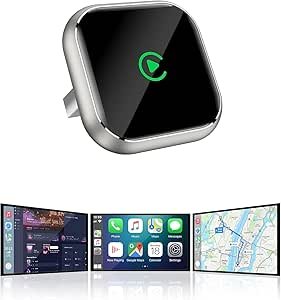
Wireless CarPlay Adapter with GPS: The Ultimate Solution for Seamless Connectivity and Navigation
Wireless CarPlay has become one of the most sought-after features in modern vehicles, offering a more convenient and intuitive way to use your iPhone while on the road. It allows you to access your apps, maps, music, and messages directly from your car’s infotainment system without the hassle of cables. However, not all vehicles come with this feature built-in, and even those that do often require a wired connection to use CarPlay.
Enter the wireless CarPlay adapter with GPS, which enables you to unlock all the benefits of wireless CarPlay and integrate GPS functionality without needing to connect your phone via a cable. This compact device plugs into your car’s USB port and establishes a wireless connection between your iPhone and the car’s infotainment system, allowing for a seamless experience.
In this article, we’ll dive into the benefits of using a wireless CarPlay adapter with GPS, key features to consider, and top recommendations for the best models available.
What is a Wireless CarPlay Adapter with GPS?
A wireless CarPlay adapter with GPS is a device that connects your iPhone to your car’s infotainment system wirelessly, enabling the use of Apple’s CarPlay feature without the need for a physical connection. It also includes GPS functionality, which ensures that your maps and navigation apps work flawlessly while you’re on the go.
Essentially, the adapter acts as a bridge between your iPhone and your car, allowing you to:
- Stream Apple Music and podcasts.
- Send and receive messages and calls hands-free.
- Use navigation apps like Apple Maps, Google Maps, or Waze.
- Access compatible third-party apps that support CarPlay.
In addition to providing a wireless CarPlay connection, the GPS functionality ensures that your maps are up-to-date and that your location data is accurate, even when you’re on long trips or driving in remote areas.
Benefits of Using a Wireless CarPlay Adapter with GPS
1. Seamless Wireless Connectivity
- The most obvious benefit of a wireless CarPlay adapter is the elimination of cables. Once paired with your car’s infotainment system, your iPhone will connect automatically every time you start the car, providing an instant, cable-free connection for all your apps and features.
2. Improved Navigation
- With built-in GPS, the adapter ensures that you always have access to real-time, accurate navigation data. Whether you’re using Apple Maps, Google Maps, or Waze, the GPS ensures seamless route guidance, traffic updates, and the best routes to your destination.
3. Enhanced Safety
- Wireless CarPlay reduces the need to fiddle with your phone while driving. You can control your phone through the infotainment screen or voice commands, keeping your hands on the wheel and your eyes on the road for a safer driving experience.
- Siri integration allows you to control your phone with voice commands, so you can send texts, make calls, and get directions without lifting a finger.
4. Compatibility with Older Cars
- Many older vehicles don’t come with built-in wireless CarPlay functionality. A wireless adapter allows you to retrofit your car with modern technology without having to replace your entire infotainment system. It can be a cost-effective way to bring your older car up to speed with the latest Apple technology.
5. Support for Multiple Apps
- The adapter supports a wide range of apps that work with CarPlay, such as music, navigation, audiobooks, podcasts, and more. This flexibility ensures you can enjoy your favorite entertainment and stay connected while driving.
6. Convenience and Ease of Use
- After the initial setup, you won’t need to plug in your iPhone every time you get in the car. The adapter ensures a quick and easy connection, allowing you to jump into your car and drive without any hassle.
Key Features to Look for in a Wireless CarPlay Adapter with GPS
When choosing a wireless CarPlay adapter with GPS, there are several factors to consider to ensure you get the best performance and functionality:
1. Compatibility
- Car Compatibility: Ensure that your car’s infotainment system is compatible with Apple CarPlay. Most modern vehicles support CarPlay, but older models may require a software update or a compatible third-party adapter.
- iPhone Compatibility: Check that the adapter is compatible with your iPhone model. Most wireless CarPlay adapters work with iPhones running iOS 9.0 or later, but some features may require newer versions of iOS.
2. Ease of Setup
- The adapter should be easy to install and set up. Ideally, it should simply plug into your car’s USB port, pair with your iPhone via Bluetooth or Wi-Fi, and automatically connect every time you start the car.
3. Stable Connection
- Look for adapters with stable wireless connections. The connection should be strong enough to support audio streaming, navigation, and phone calls without frequent dropouts or lag.
4. GPS Functionality
- Ensure that the adapter provides accurate GPS data. It should support real-time traffic updates and route guidance, allowing you to use navigation apps like Apple Maps, Google Maps, or Waze effectively.
5. USB Port for Charging
- Many wireless CarPlay adapters come with a USB port that can charge your iPhone while it’s connected. Look for a model with an extra USB port for this feature, especially if you plan to use your phone for long trips.
6. Support for Voice Control
- Voice control is an essential feature for hands-free operation. Ensure that the adapter supports Siri or other voice assistants for controlling music, messages, navigation, and more without touching your phone.
7. Firmware Updates
- Choose an adapter that offers firmware updates to ensure compatibility with future versions of iOS and to fix any bugs or connectivity issues.
8. Design and Durability
- The design should be compact and durable, as it will be exposed to heat and vibrations in your car. Look for adapters that are made from high-quality materials and have a rugged design to withstand the rigors of daily use.
Top Wireless CarPlay Adapters with GPS
Here are some of the best wireless CarPlay adapters with GPS that offer excellent performance and functionality:
1. Caroer Wireless CarPlay Adapter with GPS
- Best For: Seamless wireless connection and reliable GPS functionality.
- Key Features:
- Compatible with most CarPlay-enabled vehicles.
- GPS integration for accurate and real-time navigation.
- Automatic wireless connection every time you start the car.
- Supports Siri voice control for hands-free operation.
- Compact design with USB charging port for your iPhone.
- Pros: Easy setup, reliable connection, supports GPS navigation.
- Cons: May require periodic firmware updates for compatibility with newer iOS versions.
2. Airdual Wireless CarPlay Adapter
- Best For: Simplicity and reliability in older vehicles.
- Key Features:
- Compatible with vehicles that support wired CarPlay.
- Fast pairing and automatic reconnection after initial setup.
- Built-in GPS support for navigation apps.
- Plug-and-play installation with no additional software needed.
- Pros: Simple installation, stable connection, compact.
- Cons: Limited compatibility with certain car models (check before buying).
3. CarLinkit 3.0 Wireless CarPlay Adapter
- Best For: High-speed wireless connection and GPS support.
- Key Features:
- Supports both wired and wireless CarPlay connections.
- GPS functionality for accurate navigation and map support.
- Fast connection speeds for a smooth, lag-free experience.
- Multiple USB ports for iPhone charging and other devices.
- Pros: Supports both wireless and wired CarPlay, reliable GPS.
- Cons: Requires a bit of setup for first-time use.
4. Nulaxy Wireless CarPlay Adapter with GPS
- Best For: Budget-friendly option with essential features.
- Key Features:
- Plug-and-play wireless connection for seamless integration with CarPlay.
- Includes GPS for real-time navigation and map support.
- Compact and durable design for long-lasting use.
- Voice control via Siri for hands-free operation.
- Pros: Affordable, easy setup, reliable GPS.
- Cons: Some users report occasional connection issues in certain vehicles.
5. ZUS Wireless CarPlay Adapter
- Best For: Easy-to-use wireless CarPlay with additional features.
- Key Features:
- Works with both wired and wireless CarPlay setups.
- Supports GPS navigation with popular apps like Apple Maps and Google Maps.
- Fast, stable wireless connection for a smooth driving experience.
- USB charging port to keep your phone charged during use.
- Pros: Fast connection, user-friendly interface, compact design.
- Cons: Limited compatibility with some car models.
Conclusion
A wireless CarPlay adapter with GPS is a game-changer for.
