
Wireless CarPlay Adapter for Apple iPhone
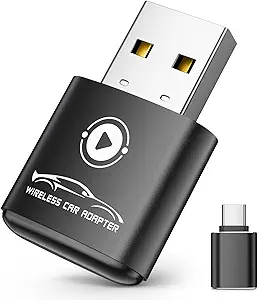
Wireless CarPlay Adapter for Apple iPhone: Seamless, Cord‑Free In‑Car Connectivity
A Wireless CarPlay adapter lets you enjoy Apple CarPlay without plugging in a cable every time you get in your car. Simply connect your iPhone via Bluetooth/Wi‑Fi and instantly access navigation, music, calls, messages, and voice control — all hands‑free and cord‑free. This little gadget transforms a wired CarPlay system into a modern wireless experience.
Whether you’re driving to work, on a road trip, or running errands, a wireless CarPlay adapter makes in‑car tech smoother, safer, and more convenient.
What Is a Wireless CarPlay Adapter?
A wireless CarPlay adapter is a compact dongle that plugs into your car’s existing USB CarPlay port. Once connected, it creates a wireless bridge between your iPhone and your car’s infotainment system so you can use CarPlay features without a Lightning cable.
Works with:
✔ iPhone models that support Apple CarPlay
✔ Cars with factory or aftermarket wired CarPlay
Not required for: Cars with native built‑in wireless CarPlay
Key Benefits
🚗 Convenience:
Just get in and go — no cables to plug in every time.
📱 Hands‑Free Control:
Use Siri voice commands for navigation, texting, music, and calls.
🎵 Streamlined Dash:
Cleaner car interior with fewer cables cluttering your console.
🔁 Compatibility:
Works with most CarPlay‑equipped head units (factory or aftermarket).
⏱ Quick Setup:
Pair once, and the adapter reconnects automatically.
How It Works — Simple Steps
- Plug Adapter into USB CarPlay Port
— The same port you normally use with a cable. - Turn On Your Car
— Adapter powers up. - Pair iPhone Once
— Connect via Bluetooth/Wi‑Fi as directed. - Automatic Connect Next Time
— Just start the car and CarPlay launches wirelessly.
Feature Comparison — What to Expect
| Feature | Wireless CarPlay Adapter | Wired CarPlay |
|---|---|---|
| Connection Type | Wireless (Wi‑Fi/Bluetooth) | USB Cable |
| Ease of Use | Plug & drive | Must plug in each time |
| Audio Quality | High (Wi‑Fi) | Very High |
| Hands‑Free Access | Yes | Yes |
| Charging While Connected | Depends on adapter/port | Always |
| Compatibility | Cars w/ wired CarPlay only | All CarPlay cars |
Typical Features to Look For
- Stable Wireless Connection: Wi‑Fi rather than Bluetooth‑only for smoother CarPlay.
- Automatic Reconnect: No pairing every trip.
- Low Latency: Fast response for Maps, audio, and Siri.
- Compact Design: Fits neatly behind the dashboard.
- Firmware Updates: Option to update compatibility & features.
Compatible Car Scenarios
Great Fit For:
✔ Cars with wired Apple CarPlay but no wireless option
✔ Rental cars where you can plug into USB
✔ Drivers who want cable‑free convenience
Not Needed If:
⚠ Your car already supports native wireless Apple CarPlay
⚠ You don’t use CarPlay frequently
Everyday Uses & Benefits
📍 Navigation
Use Apple Maps, Waze, or Google Maps without plugging in — just speak to Siri.
🎶 Music & Podcasts
Stream Apple Music, Spotify, Podcasts, Audible, and more wirelessly.
☎ Hands‑Free Calls & Messages
Send/receive texts and calls safely with Siri voice control.
📅 Calendar & Alerts
View upcoming appointments and alerts on your car screen without cables.
Quick Setup Tips
- Pair iPhone via Bluetooth First:
— This often triggers the wireless Wi‑Fi connection for CarPlay. - Keep iOS Updated:
— Latest iOS improves compatibility. - Use a Quality USB Port:
— Some vehicles have low‑power ports; use one labeled for media/CarPlay. - Restart Adapter & iPhone (If Needed):
— Solves most connection hiccups.
Common Questions
Q: Will this charge my iPhone?
A: It depends on your car’s USB port. Some adapters pass through power, others don’t — so charging may be slower or require a separate cable.
Q: Is wireless CarPlay slower than wired?
A: Performance is excellent with Wi‑Fi‑based adapters, though initial connection may take a couple of seconds longer.
Q: Will it work with Android Auto?
A: Only if the adapter explicitly supports wireless Android Auto.
Best Practices for Smooth Wireless CarPlay
- Keep the adapter firmly plugged in (no loose connections).
- Update the adapter firmware when available.
- Don’t pair multiple devices at the same time.
- Use Wi‑Fi priority adapters over Bluetooth‑only models for smoother navigation and audio.
Bottom Line
A Wireless CarPlay adapter for Apple iPhone transforms your wired CarPlay system into a fast, intuitive, cable‑free experience. It’s ideal for drivers who want effortless connectivity, safer hands‑free access, and a cleaner dashboard without losing any of the features you love about Apple CarPlay.
Whether you’re heading to work each day or planning long road trips, this tiny adapter makes your car smarter and your drives more enjoyable.
*(Disclosure: As an Amazon Associate, this content may earn a commission from qualifying purchases at no additional cost to you.)*
