
Wireless CarPlay Converter
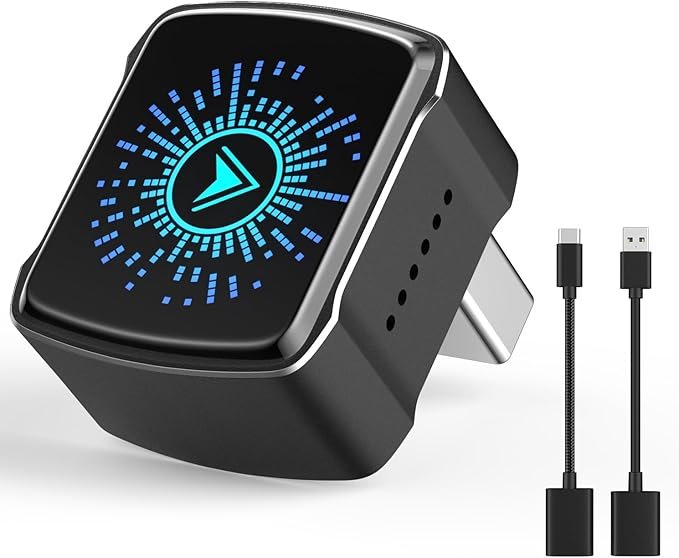
Fast Connect Wireless CarPlay Converter Review — A Practical Look Before You Buy
If you’ve ever wished your car’s built-in Apple CarPlay could go wireless without spending hundreds on a new head unit, a Fast Connect Wireless CarPlay Converter might seem like an appealing solution. These plug-and-play adapters promise to convert a wired CarPlay connection into a wireless one, letting you enjoy hands-free navigation, music, and calls without fumbling with a cable. In this review, we’ll walk through how these converters work, what benefits and limitations they actually offer, and key points to consider before buying.
What Is a Fast Connect Wireless CarPlay Converter?
Simply put, this device plugs into your car’s USB port (where you normally connect your iPhone) and enables your vehicle’s CarPlay system to work wirelessly. Once paired, your phone should connect automatically when you get into the car, similar to how Bluetooth devices connect.
Unlike a full aftermarket head unit upgrade, a wireless CarPlay adapter aims to give you the convenience of wireless connectivity while preserving your car’s original infotainment system.
How It Works: A Quick Overview
Most wireless CarPlay converters use Bluetooth or Wi-Fi to communicate with your iPhone. The adapter acts as a bridge: your phone thinks it’s connected via USB, while actually communicating over a wireless link. Setup is usually straightforward — plug the adapter into your car’s USB port, initiate pairing on your iPhone, and the system should remember the connection going forward.
Benefits of Going Wireless
Truly Cable-Free Convenience
The biggest advantage is obvious: no more plugging and unplugging your Lightning cable every time you drive. For many users, this alone is reason enough to consider a wireless adapter.
Retain Your Existing CarPlay Interface
Since this converter doesn’t replace your head unit, you keep all factory features and controls, including steering-wheel button functions and OEM display elements.
Automatic Reconnection
Once paired, many adapters automatically reconnect when you start the car and wake your phone — ideal for frequent short trips or daily commuting.
Things to Consider Before You Buy
Compatibility With Your Car and iPhone
Wireless CarPlay converters are not universally compatible. Make sure the specific product you choose supports your car’s year, make, and model, as well as your iPhone version. Some older systems may not support wireless CarPlay at all, even with an adapter.
Bluetooth vs Wi-Fi Performance
Some adapters rely on Bluetooth for initial pairing and then switch to Wi-Fi for data. This dual-mode approach generally offers better performance than Bluetooth-only devices, but can be slightly more complex to set up.
Occasional Connectivity Hiccups
Wireless connections can be less stable than wired ones, especially in vehicles with heavy electronic interference or weak Wi-Fi signal. Users sometimes report occasional disconnections or slower response times compared to a direct cable connection.
Charging Limitations
Many wireless CarPlay adapters draw power from the same USB port used to charge your phone. This means you may lose fast charging capabilities or need an additional charger in another port.
Subscription and App Requirements
While most Fast Connect converters don’t require a subscription, some models use companion apps to manage updates or settings. Make sure you’re comfortable installing and using any required software.
Real-World Experience: What Users Commonly Report
From user reviews and personal experience with wireless CarPlay adapters, a few patterns emerge:
- Convenience wins: Most drivers enjoy the ease of wireless connectivity, especially for quick trips and ride-sharing.
- Setup varies: Initial pairing can be straightforward, but some adapters take a few tries before the phone and adapter sync reliably.
- Performance differences: Higher-quality adapters tend to maintain stable connections better and support more frequent automatic wake-ups, while cheaper options may drop connection or lag slightly.
Who Should Consider a Wireless CarPlay Converter?
A Fast Connect Wireless CarPlay Converter is ideal if you:
- Want a cable-free setup without replacing your car’s stereo
- Use CarPlay frequently and find cables inconvenient
- Drive a compatible vehicle with a factory CarPlay system
It may be less suitable if:
- You need the fastest possible response and absolute stability
- Your car doesn’t support CarPlay natively
- You rely heavily on fast charging from your USB port
Final Thoughts
A Fast Connect Wireless CarPlay Converter can be a simple, cost-effective way to enjoy wireless CarPlay without a major upgrade. While it won’t match the performance and polish of a dedicated aftermarket system, many drivers find the convenience well worth it. Before purchasing, check compatibility with your vehicle and iPhone, and be prepared for occasional wireless quirks.
