
Wireless charger for iphone
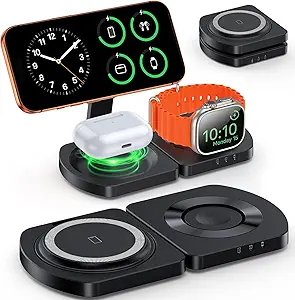
Wireless Charger for iPhone: The Ultimate Convenience for Your Charging Needs
In today’s fast-paced world, convenience is everything, especially when it comes to charging your devices. Wireless chargers for iPhone provide a sleek, efficient, and hassle-free way to power up your device without the mess of tangled cords. With the growing popularity of wireless charging, more iPhone models are supporting this technology, allowing users to enjoy a cleaner, more convenient charging experience.
If you’re looking to upgrade your charging setup or simply want to explore the world of wireless charging, this guide will provide you with all the information you need about wireless chargers for iPhones—including their benefits, how they work, and how to choose the best one for your needs.
What is a Wireless Charger for iPhone?
A wireless charger for iPhone is a charging device that allows you to charge your iPhone without needing to plug in a cable. Instead, you place your iPhone on a charging pad or stand that uses inductive charging to transfer power from the charging station to your phone. The process involves two coils—one in the charger and one in your iPhone—creating an electromagnetic field to transfer energy and charge your phone’s battery.
Wireless charging is supported by newer iPhone models, specifically those with Qi wireless charging technology. iPhones from the iPhone 8 onward are compatible with Qi wireless charging, making it easy for users to switch from traditional wired charging to a more modern, cable-free option.
Benefits of Using a Wireless Charger for iPhone
1. Convenience
One of the biggest advantages of a wireless charger is the sheer convenience. No more fumbling around for cables or worrying about whether your charging cable is damaged or tangled. Simply place your iPhone on the charging pad or stand, and it will start charging automatically. This is especially useful at night, when you simply need to set your phone down before bed and grab it again in the morning.
2. Clutter-Free
Wireless charging reduces cable clutter. Gone are the days of multiple cords hanging from every corner of your desk or nightstand. With a wireless charger, you only need a clean, flat surface for your iPhone to charge, helping keep your space tidy and organized.
3. Improved Durability
Frequent plugging and unplugging of a charging cable can cause wear and tear on both the cable and the port on your phone. Wireless charging helps to preserve the longevity of both by eliminating the need for physical connections. Your phone’s charging port stays safe from dust, lint, and other potential damage caused by frequent use.
4. Universal Compatibility
Most wireless chargers are compatible with a wide range of devices—not just iPhones but also other Qi-enabled smartphones, including Samsung, Google, and more. This means you can use the same charger for multiple devices, which is ideal if you have a household with mixed devices.
5. Efficient Charging
Wireless charging technology has advanced significantly, and many wireless chargers now offer fast charging capabilities. Newer wireless chargers can charge your iPhone as quickly as wired charging, and in some cases, even faster, depending on the model.
How Wireless Charging Works for iPhone
Wireless charging for iPhones uses Qi (pronounced “chee”) technology, which is the universal standard for wireless charging. Here’s how it works:
- Inductive Charging: The charger has a coil that generates an electromagnetic field. When you place your iPhone on the charger, another coil inside your iPhone receives the energy from the electromagnetic field, converting it into electrical power that charges the phone’s battery.
- Alignment: For optimal charging, the coils in your iPhone and the charger need to be aligned properly. Most wireless chargers have a designated area where you should place your phone to ensure efficient energy transfer.
- Power Transfer: Once aligned, the wireless charger starts transferring power to your iPhone. The charging speed depends on the charger’s output and the iPhone’s charging capabilities.
- Feedback Mechanism: Most wireless chargers have an indicator light that shows whether the charging process is active. Some chargers also have built-in safety features to prevent overheating or overcharging, ensuring that your iPhone charges safely.
Types of Wireless Chargers for iPhone
There are several types of wireless chargers to consider, depending on your needs and how you plan to use the charger:
1. Charging Pads
Wireless charging pads are the most basic and commonly used type of wireless charger. They consist of a flat surface where you place your phone to charge. Charging pads are typically smaller and portable, making them perfect for desks, nightstands, or travel.
- Pros: Simple, compact, and cost-effective.
- Ideal for: Those who want a basic, hassle-free charging experience.
2. Charging Stands
Wireless charging stands elevate your iPhone, allowing you to view the screen while it charges. They’re typically angled so you can easily use your phone for watching videos, making video calls, or reading messages without having to pick it up.
- Pros: Hands-free use while charging, allows for easier screen visibility.
- Ideal for: People who use their phone frequently while charging, such as during work or watching media.
3. Wireless Charging Docks
These are more advanced wireless chargers that often include multiple charging pads in one. You can charge your iPhone, Apple Watch, and AirPods simultaneously on the same dock.
- Pros: Multi-device charging, space-saving design.
- Ideal for: People who own multiple Apple devices and want to charge them all in one place.
4. Portable Wireless Chargers
For those who are always on the go, portable wireless chargers (also known as wireless power banks) are a great option. These chargers allow you to charge your iPhone wirelessly while you’re out and about, making them perfect for travel, outdoor activities, or long days away from home.
- Pros: Compact, portable, no need for cables.
- Ideal for: Frequent travelers or anyone who needs a charger that’s easy to carry.
5. Car Wireless Chargers
If you’re looking to charge your iPhone while driving, a wireless car charger might be the perfect solution. These chargers attach to your car’s air vent or dashboard and allow you to charge your iPhone wirelessly while you’re on the road.
- Pros: Convenient for long drives, hands-free charging.
- Ideal for: Drivers who want to charge their phones safely without cables in the car.
How to Choose the Best Wireless Charger for iPhone
When selecting the best wireless charger for your iPhone, there are several factors to consider:
1. Charging Speed
Not all wireless chargers are created equal. Look for a charger that supports fast wireless charging, especially if you have an iPhone model that supports Qi Fast Charging (such as iPhone 8 and newer). A charger that supports 10W or 15W output will charge your phone faster than one that supports only 5W.
2. Compatibility
Ensure the wireless charger is compatible with your iPhone model. Most wireless chargers are universal, but if you’re using an older iPhone model, check that it supports Qi charging. Newer models (iPhone 12 and later) also support MagSafe, so choosing a MagSafe-compatible charger can provide even better alignment and faster charging.
3. Design and Portability
Consider where you’ll be using the charger. If you want something for your nightstand, a charging stand might be best. For portability, a slim charging pad or portable charger could be more convenient. If you need a multi-device charger, consider a charging dock.
4. Safety Features
Look for wireless chargers that offer built-in safety features like overcharge protection, overheating protection, and foreign object detection. These features help ensure that your iPhone charges safely and doesn’t overheat, reducing the risk of damage.
5. Brand Reputation and Reviews
Choose a charger from a reputable brand with positive customer reviews. Brands like Anker, Belkin, Mophie, and Spigen are well-known for producing high-quality wireless chargers that offer reliable performance and durability.
Best Wireless Chargers for iPhone
Here are a few highly recommended wireless chargers for iPhone:
- Anker Wireless Charger (10W)
- Features: Compact design, fast charging, overcharge protection, compatible with most iPhones.
- Ideal for: Those who want a reliable and affordable charging pad.
- Mophie 3-in-1 Wireless Charging Pad
- Features: Charges iPhone, Apple Watch, and AirPods simultaneously, supports 7.5W wireless charging.
- Ideal for: People with multiple Apple devices.
- Belkin Boost Up Wireless Charging Pad
- Features: 10W fast charging, designed for iPhones, sleek and slim design.
- Ideal for: Fast and efficient wireless charging at home or in the office.
- Spigen MagFit Wireless Charger
- Features: MagSafe-compatible, sleek design, fast 15W charging for iPhone 12 and later.
- Ideal for: iPhone 12 and newer models that support MagSafe.
- CHOETECH Wireless Charger
- Features: 10W fast charging, affordable, works with most iPhone models.
- Ideal for: Budget-conscious buyers who still want fast charging.
Conclusion
A wireless charger for iPhone is a convenient and modern solution for keeping
In today’s fast-paced world, convenience is everything, especially when it comes to charging your devices. Wireless chargers for iPhone provide a sleek, efficient, and hassle-free way to power up your device without the mess of tangled cords. With the growing popularity of wireless charging, more iPhone models are supporting this technology, allowing users to enjoy a cleaner, more convenient charging experience.
If you’re looking to upgrade your charging setup or simply want to explore the world of wireless charging, this guide will provide you with all the information you need about wireless chargers for iPhones—including their benefits, how they work, and how to choose the best one for your needs.
What is a Wireless Charger for iPhone?
A wireless charger for iPhone is a charging device that allows you to charge your iPhone without needing to plug in a cable. Instead, you place your iPhone on a charging pad or stand that uses inductive charging to transfer power from the charging station to your phone. The process involves two coils—one in the charger and one in your iPhone—creating an electromagnetic field to transfer energy and charge your phone’s battery.
Wireless charging is supported by newer iPhone models, specifically those with Qi wireless charging technology. iPhones from the iPhone 8 onward are compatible with Qi wireless charging, making it easy for users to switch from traditional wired charging to a more modern, cable-free option.
Benefits of Using a Wireless Charger for iPhone
1. Convenience
One of the biggest advantages of a wireless charger is the sheer convenience. No more fumbling around for cables or worrying about whether your charging cable is damaged or tangled. Simply place your iPhone on the charging pad or stand, and it will start charging automatically. This is especially useful at night, when you simply need to set your phone down before bed and grab it again in the morning.
2. Clutter-Free
Wireless charging reduces cable clutter. Gone are the days of multiple cords hanging from every corner of your desk or nightstand. With a wireless charger, you only need a clean, flat surface for your iPhone to charge, helping keep your space tidy and organized.
3. Improved Durability
Frequent plugging and unplugging of a charging cable can cause wear and tear on both the cable and the port on your phone. Wireless charging helps to preserve the longevity of both by eliminating the need for physical connections. Your phone’s charging port stays safe from dust, lint, and other potential damage caused by frequent use.
4. Universal Compatibility
Most wireless chargers are compatible with a wide range of devices—not just iPhones but also other Qi-enabled smartphones, including Samsung, Google, and more. This means you can use the same charger for multiple devices, which is ideal if you have a household with mixed devices.
5. Efficient Charging
Wireless charging technology has advanced significantly, and many wireless chargers now offer fast charging capabilities. Newer wireless chargers can charge your iPhone as quickly as wired charging, and in some cases, even faster, depending on the model.
How Wireless Charging Works for iPhone
Wireless charging for iPhones uses Qi (pronounced “chee”) technology, which is the universal standard for wireless charging. Here’s how it works:
- Inductive Charging: The charger has a coil that generates an electromagnetic field. When you place your iPhone on the charger, another coil inside your iPhone receives the energy from the electromagnetic field, converting it into electrical power that charges the phone’s battery.
- Alignment: For optimal charging, the coils in your iPhone and the charger need to be aligned properly. Most wireless chargers have a designated area where you should place your phone to ensure efficient energy transfer.
- Power Transfer: Once aligned, the wireless charger starts transferring power to your iPhone. The charging speed depends on the charger’s output and the iPhone’s charging capabilities.
- Feedback Mechanism: Most wireless chargers have an indicator light that shows whether the charging process is active. Some chargers also have built-in safety features to prevent overheating or overcharging, ensuring that your iPhone charges safely.
Types of Wireless Chargers for iPhone
There are several types of wireless chargers to consider, depending on your needs and how you plan to use the charger:
1. Charging Pads
Wireless charging pads are the most basic and commonly used type of wireless charger. They consist of a flat surface where you place your phone to charge. Charging pads are typically smaller and portable, making them perfect for desks, nightstands, or travel.
- Pros: Simple, compact, and cost-effective.
- Ideal for: Those who want a basic, hassle-free charging experience.
2. Charging Stands
Wireless charging stands elevate your iPhone, allowing you to view the screen while it charges. They’re typically angled so you can easily use your phone for watching videos, making video calls, or reading messages without having to pick it up.
- Pros: Hands-free use while charging, allows for easier screen visibility.
- Ideal for: People who use their phone frequently while charging, such as during work or watching media.
3. Wireless Charging Docks
These are more advanced wireless chargers that often include multiple charging pads in one. You can charge your iPhone, Apple Watch, and AirPods simultaneously on the same dock.
- Pros: Multi-device charging, space-saving design.
- Ideal for: People who own multiple Apple devices and want to charge them all in one place.
4. Portable Wireless Chargers
For those who are always on the go, portable wireless chargers (also known as wireless power banks) are a great option. These chargers allow you to charge your iPhone wirelessly while you’re out and about, making them perfect for travel, outdoor activities, or long days away from home.
- Pros: Compact, portable, no need for cables.
- Ideal for: Frequent travelers or anyone who needs a charger that’s easy to carry.
5. Car Wireless Chargers
If you’re looking to charge your iPhone while driving, a wireless car charger might be the perfect solution. These chargers attach to your car’s air vent or dashboard and allow you to charge your iPhone wirelessly while you’re on the road.
- Pros: Convenient for long drives, hands-free charging.
- Ideal for: Drivers who want to charge their phones safely without cables in the car.
How to Choose the Best Wireless Charger for iPhone
When selecting the best wireless charger for your iPhone, there are several factors to consider:
1. Charging Speed
Not all wireless chargers are created equal. Look for a charger that supports fast wireless charging, especially if you have an iPhone model that supports Qi Fast Charging (such as iPhone 8 and newer). A charger that supports 10W or 15W output will charge your phone faster than one that supports only 5W.
2. Compatibility
Ensure the wireless charger is compatible with your iPhone model. Most wireless chargers are universal, but if you’re using an older iPhone model, check that it supports Qi charging. Newer models (iPhone 12 and later) also support MagSafe, so choosing a MagSafe-compatible charger can provide even better alignment and faster charging.
3. Design and Portability
Consider where you’ll be using the charger. If you want something for your nightstand, a charging stand might be best. For portability, a slim charging pad or portable charger could be more convenient. If you need a multi-device charger, consider a charging dock.
4. Safety Features
Look for wireless chargers that offer built-in safety features like overcharge protection, overheating protection, and foreign object detection. These features help ensure that your iPhone charges safely and doesn’t overheat, reducing the risk of damage.
5. Brand Reputation and Reviews
Choose a charger from a reputable brand with positive customer reviews. Brands like Anker, Belkin, Mophie, and Spigen are well-known for producing high-quality wireless chargers that offer reliable performance and durability.
Best Wireless Chargers for iPhone
Here are a few highly recommended wireless chargers for iPhone:
- Anker Wireless Charger (10W)
- Features: Compact design, fast charging, overcharge protection, compatible with most iPhones.
- Ideal for: Those who want a reliable and affordable charging pad.
- Mophie 3-in-1 Wireless Charging Pad
- Features: Charges iPhone, Apple Watch, and AirPods simultaneously, supports 7.5W wireless charging.
- Ideal for: People with multiple Apple devices.
- Belkin Boost Up Wireless Charging Pad
- Features: 10W fast charging, designed for iPhones, sleek and slim design.
- Ideal for: Fast and efficient wireless charging at home or in the office.
- Spigen MagFit Wireless Charger
- Features: MagSafe-compatible, sleek design, fast 15W charging for iPhone 12 and later.
- Ideal for: iPhone 12 and newer models that support MagSafe.
- CHOETECH Wireless Charger
- Features: 10W fast charging, affordable, works with most iPhone models.
- Ideal for: Budget-conscious buyers who still want fast charging.
Conclusion
A wireless charger for iPhone is a convenient and modern solution for keeping.
