
Wireless mouse for laptop
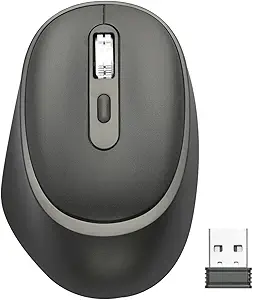
Wireless Mouse for Laptop/PC — Comfort, Precision & Cord‑Free Control
A wireless mouse for laptop/PC is one of the simplest upgrades you can make to your computer setup — but it can have a big impact on comfort, productivity, and everyday use. Whether you’re working, gaming, studying, or browsing, a wireless mouse gives you cord‑free freedom, reduces desktop clutter, and offers smooth tracking that feels natural compared to a laptop’s touchpad.
This guide breaks down what a wireless mouse is, how it works, key features, how to choose the right one, and real‑world usage tips.
What Is a Wireless Mouse?
A wireless mouse is a computer pointing device that connects without a cable — typically via:
- Bluetooth, or
- USB RF dongle (2.4 GHz receiver)
This lets you move and click without a cord tethered to your laptop or desktop, giving you a cleaner workspace and more flexibility in how you use your device.
How Wireless Mice Connect
| Connection Type | How It Works | Pros | Cons |
|---|---|---|---|
| Bluetooth | Uses built‑in Bluetooth in your laptop/PC | No dongle needed; works with many devices | Slightly higher latency on some systems |
| USB RF Receiver | Uses a small USB plug‑in dongle (2.4 GHz) | Reliable, low latency | Occupies a USB port |
| Multi‑Device (Bluetooth + Dongle) | Lets you switch between modes | Flexible; works with many devices | A bit more setup |
Tip: If your laptop has limited USB ports, Bluetooth offers a port‑free solution — while a 2.4 GHz dongle typically gives stronger responsiveness (especially in noisy environments).
Why a Wireless Mouse Is Worth It
🎯 Enhanced Ergonomics
Extended use of a touchpad can strain your fingers and wrist. A wireless mouse offers:
- Natural hand position
- Better wrist support
- Reduced strain for long work sessions
⚡ Freedom of Movement
No cords means you can:
- Move more freely
- Use your laptop from a distance (e.g., with a small desk setup)
- Sit more comfortably while browsing or watching videos
🖱 Better Precision & Control
Good wireless mice have:
- Smooth optical/laser tracking
- Adjustable DPI (sensitivity)
- Responsive clicking and scrolling
This matters for productivity and gaming.
🧹 Clutter‑Free Desk
No cable tangles means:
- Neater workspace
- Easier travel setup
- Less wear on USB connectors
What to Look For — Key Features
📏 DPI (Dots Per Inch) / Sensitivity
- 800–1,200 DPI: Everyday productivity
- 1,200–3,000 DPI: Creative design, multitasking
- 3,000+ DPI: Detail work, some gaming
Higher DPI means the cursor moves farther with small hand movement.
🔋 Battery Life
Check whether the mouse uses:
- Rechargeable battery (USB‑C/Lightning)
- Replaceable batteries (AA/AAA)
Some models last weeks or months per charge, with battery indicators to help you plan.
🪶 Ergonomics & Grip Style
Comfort matters! Common shapes include:
- Palm grip: Full hand support
- Claw grip: Fingertip precision
- Ambidextrous: For left & right users
🔁 Buttons & Features
- Scroll wheel quality
- Extra side buttons (back/forward)
- Profile switch buttons (for DPI or macros)
These add flexibility for browsing, productivity, and gaming.
📶 Latency & Responsiveness
Low latency is key — especially for gaming or creative design. USB dongles often have lower latency than Bluetooth, though higher‑end Bluetooth mice perform very well.
💡 RGB / Custom Lighting (Optional)
Adds aesthetic appeal, useful for gaming setups or workstation mood lighting.
Wireless Mouse Comparison Chart
| Feature | Good for Everyday Use | Good for Productivity | Good for Gaming |
|---|---|---|---|
| DPI Range | 800–1,200 | 1,600–2,400 | 3,000+ |
| Battery Life | High | High | Medium–High |
| Connection | Bluetooth or Dongle | Either | USB RF Dongle |
| Extra Buttons | Minimal | Moderate | Several |
| Ergonomics | Comfortable | Ergonomic | Performance‑oriented |
Popular Use Cases
💼 Office & Productivity
- Fast scrolling through documents
- Precise selection and editing
- Comfortable for long tasks
🖥 Daily Browsing & Streaming
- Comfortable navigation
- No cord clutter near your couch or bed
🎮 Casual & Competitive Gaming
- Low latency tracking
- Responsive clicks
- Adjustable DPI for different game genres
🎨 Creative Work
- Fine control for photo/video editing
- Customizable sensitivity
Setup & Best Practices
1. Pair or Plug In
- For Bluetooth: enable Bluetooth on your laptop, pair from settings
- For USB dongle: plug in and wait for automatic driver installation
2. Set Sensitivity
Adjust DPI in:
- Manufacturer’s app/software
- Windows/Mac pointer settings
3. Position Correctly
Place the mouse pad on a flat, hard surface — this improves tracking.
4. Save Battery
- Turn off when not in use
- Use sleep/auto‑off modes
Positioning & Ergonomics Tips
- Keep your mouse at elbow level
- Avoid raised wrists — use a soft wrist pad if needed
- Click gently — heavy grips increase strain
- Change posture frequently
Maintenance & Care
✔ Clean regularly (wipe sensor and buttons)
✔ Avoid crumbs and liquid contact
✔ Replace batteries if using consumable cells
✔ Update drivers/software for best performance
FAQs
Q: Will it work on any laptop?
A: Yes — most wireless mice are plug‑and‑play with Windows, macOS, and many Linux systems.
Q: Is Bluetooth or dongle better?
A:
- Bluetooth: Saves USB ports; good for casual/office use
- Dongle: Often lower latency; better for gaming/precise tasks
Q: Does it need software?
A: Basic functions usually work without software. Optional software often enables macros, button customization, lighting control, and DPI profiles.
Final Thoughts
A wireless mouse for laptop/PC is a small investment that pays big dividends in comfort, accuracy, and convenience. Whether you’re upgrading from a touchpad, improving your workstation, or seeking better control for gaming or design, choose a mouse with the right balance of ergonomics, battery life, precision, and features for your needs.
From everyday browsing to professional workflows, a quality wireless mouse makes your laptop experience smoother, cleaner, and more enjoyable — without the hassle of wires.
*Disclosure: As an Amazon Associate, this content may earn a commission from qualifying purchases at no additional cost to you.*
